


IE9 RC launched with a new security mechanism “Tracking Protection†to identify and block many forms of undesired tracking.  Tracking Protection is an opt-in mechanism within the browser to have more control over what websites tracking ability to help keep your information private and secure. This feature can be start blocking third-party cookies to the IE 9 RC, tracking pixels, web site beacons, hit counters, analytics scripts, general website management personnel commonly used to record or track user Internet behavior of tools.
How to Enable Tracking Protection
Tracking protection is disabled by default. If you want to enable it, follow the steps below:
– Open Internet Explorer
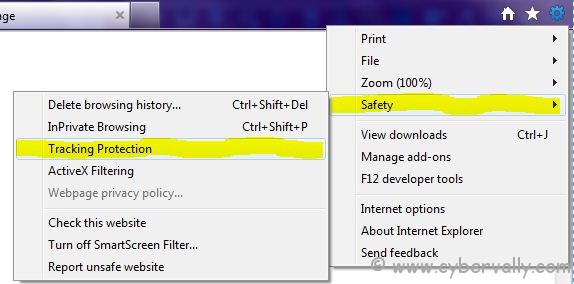
– Go to Tools -> Safety -> Tracking Protection
– Click on Your Personalized list
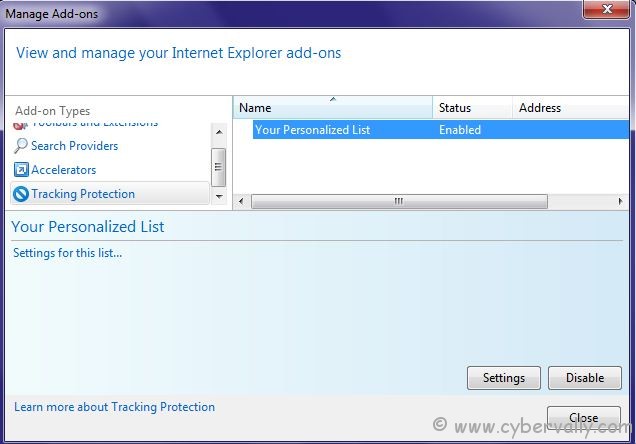
– If you have other lists installed, you can select any list to enable it.
– Click on Enable button on the bottom right of the windows to enable the selected list.
If you want to manually add any website in the tracking protection list. You can allow or block websites from the Settings window.
If you enjoyed reading this post, please consider leaving a comment below or subscribing to the feed

