


How-ToLatest Updates

How to Turn Off 2-Step Verification in Google Accounts

Google has recently added an extra layer of security to all Google accounts. The 2-step verification requires that you enter a verification code received on your phone in addition to the usual password. But the 2-step verification is not available for all the Google services like AdSense and installed Gtalk client.  If you want to turn off 2-step verification, then follow below steps.

Turn Off 2-Step Verification

1) Login to your Google account at the Google accounts.

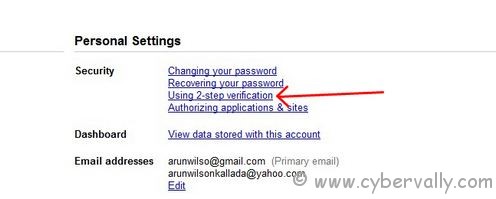
2) Click on Using 2-step verification link under the Personal Settings.

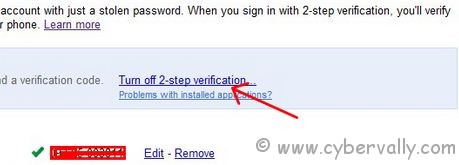
3) Click on the link Turn off 2-step verification.

4) You would be shown a confirmation dialog.
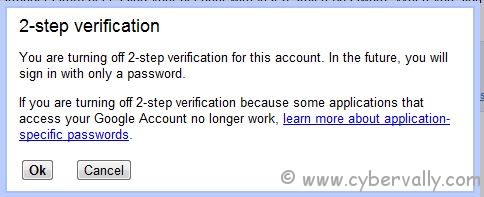

5) Click OK button in the confirmation dialog to turn off the 2-step verification for your Google account.

6) Now your 2-step verfication disabled.

If you enjoyed reading this post, please consider leaving a comment below or subscribing to the feed

About author

Articles

Arun Wilson is a self-confessed tech and gadget freak. When he isn't busy navigating life, he loves sharing the latest updates on technology, internet security, and new gadgets. Connect with Arun: Follow on X | Facebook
Related posts
ElectronicsLatest UpdatesMobile

Samsung Galaxy S26 Series Explained: Everything You Need to Know Before Buying

Samsung has officially entered the “Agentic AI” era with the launch of the Galaxy S26…
Read more
How-ToInternetLatest Updates

Building Your Own Private Cloud: A Raspberry Pi Home Storage Solution

In an age where data privacy and control are increasingly important, relying solely on commercial…
Read more
How-ToInternetLatest Updates

Unlock Your Reach: How to Drive More Traffic and Views to Instagram Reels

Instagram Reels have exploded in popularity, offering a dynamic way to share short, engaging video…
Read more

3 Comments

Comments are closed.