


How-ToLatest Updates

How to Enable Clicking Navigation Sound in Internet Explorer 9

The clicking Navigation sound can be sometimes annoying. We understand that the clicking sound is generated when you click a hyperlink in Internet Explorer. As we know that IE9 has been silenced by default. But some people like the navigation clicking sound, here is how to enable the start navigation sound.

How to Enable Clicking Navigation Sound

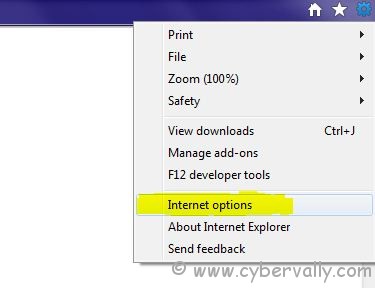
1) Open Internet Explorer.Top-right corner.

2) Click on settings icon and then choose Internet Options as shown.

3) In the Internet Options window, choose the Advanced tab.

4) Enable Play system sounds as shown.
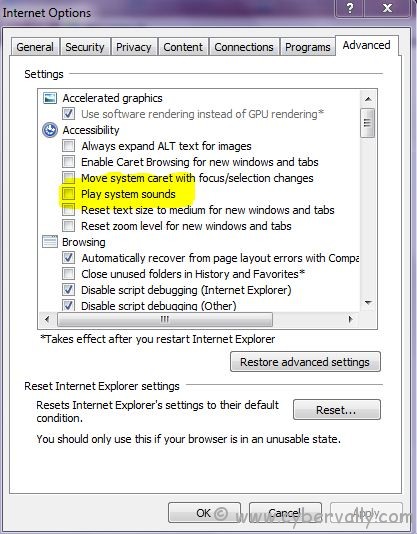
5) Click OK to save the settings.

About author

Articles

Arun Wilson is a self-confessed tech and gadget freak. When he isn't busy navigating life, he loves sharing the latest updates on technology, internet security, and new gadgets. Connect with Arun: Follow on X | Facebook
Related posts
InternetLatest Updates

Beyond Passwords: A Guide to the Different Types of 2-Factor Authentication

If your online accounts were a house, a password would be the lock on the front door. It keeps…
Read more
How-ToInternetLatest Updates

Don't Toss It! How to Turn Your Old Wi-Fi Router into a Repeater

We’ve all been there: you upgrade to a shiny new Wi-Fi router to get better speeds, and your…
Read more
Latest UpdatesTechnology

Beyond the Moat: Ditching VPNs for a Zero Trust Security Architecture

For years, the gold standard for secure remote access was the Virtual Private Network (VPN). We…
Read more