

 iGoogle is a web portal that puts almost everything that the user needs into a single location so that user can easily access it without having to leave or browse to another site. It is a kind of personalized web portal which you can customize. You can add web feeds, gadgets and can also use themes. You can also export and import iGoogle settings so you can restore the settings from the backup anytime you want. Here is how you can export and import iGoogle settings.
Steps to Setup
- Visit iGoogle web page http://www.google.com/ig/ in your web browser. You need to login to your Google account if you are not logged in.
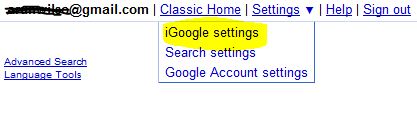
- Go top-right. Then choose iGoogle settings from the drop down menu.
- Scroll down the iGoogle settings page to the bottom and click on the Export button under the Export / Import section.
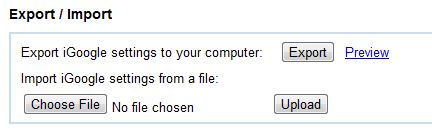
- Save the iGoogle settings in form of an XML file anywhere on your hard disk.
- For restore the iGoogle settings from the backup file you saved in the last step, you can click on the Browse button, choose the backup iGoogle settings file. Then click on the Upload button.
If you enjoyed reading this post, please consider leaving a comment below or subscribing to the feed 😀

