

Gmail automatically saves all the email addresses to which you send mails. This feature sometimes really helpful in retrieving some important email addresses. If you are sending more mails and you might not communicate with them future. For that kind of users this not a good feature. Google has decided to let users have the option of turning this ‘auto-save contacts’ feature on or off. Follow below steps for disable this feature.
Turn Off Auto-Saving Email Addresses To Contacts
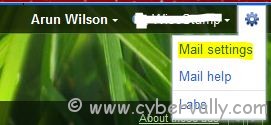
1. open Gmail and click “Mail settings†on the  top right corner of the window.
2. Go to ‘General’ tab under the settings. Scroll down and find the settings “Create contacts for auto-completeâ€.
3. select the “I’ll add contacts myself†radio button and click the “Save Changes†button.

Yep its Done. Now the new contacts in the “To†list will not get added to your Contact list automatically.
If you’re a Facebook user and want to keep up on the latest Technology news why don’t you join the CyberVally Facebook page?
If you enjoyed reading this post, please consider leaving a comment below or subscribing to the feed

