


A proxy server are mainly in two types  1) Using for increases the speed of our internet connection and hides our identity by hiding our IP address.2) Using for open blocked web sites in office and colleges. An anonymous proxy servers hides your IP address and hides information about PC. A proxy can be used for browsing blocked sites like Flickr, MySpace or YouTube, Facebook. in colleges and office.
Its quite a simple step. Search for free proxy list on Google and pick out a working proxy in the location you desire. Take care that you pick up an anonymous or high anonymous proxy.
Setup Proxy in Firefox
1) Setting up Mozilla Firefox to use a proxy is a simple and straight forward task. It only differs a bit on each operating system.
2) Run Firefox.
3) Click Tools from the menu bar.
4) Click the Options menu item.
5) Now click the Advanced icon at the right side.
6) Click the Network tab.
7) In the Connection field, click SettingsClick Manual proxy configuration.
8 ) Enter your selected proxy it in the correct field. The first field is the address, the second field is the port. If you are using a HTTP proxy then click the box for, “Use this proxy server for all protocols”.
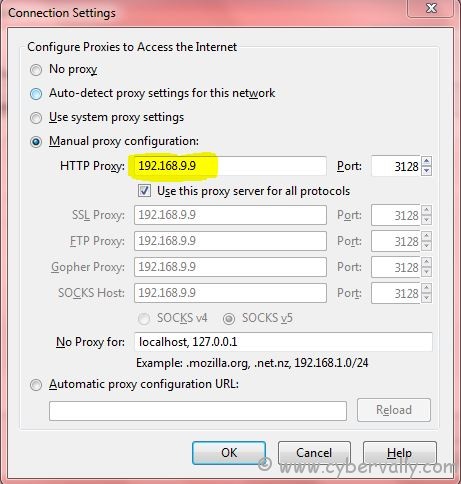
9) Click OK.Click Close.
If you’re a Facebook user and want to keep up on the latest threats and security news why don’t you join the CyberVally Facebook page?
If you enjoyed reading this post, please consider leaving a comment below or subscribing to the feed

