


Internet

Manage Who Can Send Messages To You On Facebook

The new Facebook Messages Inbox will only contain messages from your friends and their friends. All other messages will go into an other folder where you can look at them separately or you can block unwanted messages.

Steps To Setup Message Control

  • Go to the Account -> Privacy Settings .
  • Click ‘View settings’ in the ‘Connecting on Facebook’ section.
  • Change the setting for ‘Send you messages’. Your options include: Everyone, Friends and Friends of Friends.
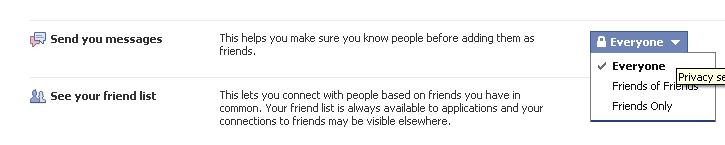
  • Only emails from people that fall within the message privacy setting you choose will be delivered to your Facebook Messages.
  • Changes to the ‘Send you messages’ privacy setting may take up to 24 hours to take effect.
  • keep your privacy and avoid the unwanted messages to your email.

About author

Articles

Arun Wilson is a self-confessed tech and gadget freak. When he isn't busy navigating life, he loves sharing the latest updates on technology, internet security, and new gadgets. Connect with Arun: Follow on X | Facebook
Related posts
InternetLatest Updates

Wi-Fi Extender vs. Mesh Network: Which One Actually Fixes Your Dead Zones?

Frustrated by Wi-Fi dead zones in your home? You’re not alone. As we rely more heavily on smart…
Read more
InternetLatest Updates

Top 5 Free Alternatives to Everyday Premium Applications

Let’s be honest: in 2026, subscription fatigue is no longer just a buzzword; it’s a verified…
Read more
InternetLatest Updates

Beyond Passwords: A Guide to the Different Types of 2-Factor Authentication

If your online accounts were a house, a password would be the lock on the front door. It keeps…
Read more