

Beginning of this month I wrote about Google motion prank. In Google motion they introduced one concept of controlling Gmail with help of body motion.  Here I like show you one tool that helps you people to control your mouse using your face motion.

This mouse control software detects movement of your face via webcam, and moves mouse on the screen accordingly. You can also do single click and double-click on the mouse with your face. You just need to have a webcam to use Camera Mouse.
How to Use Camera Mouse
1) Install the Camera Mouse software on your computer.
2) Once you start Camera Mouse, it will show a screen which will show your face captured by your webcam.
3) Select one tracking point in your face for this software to control mouse movement. Choosing your nose is a good option.
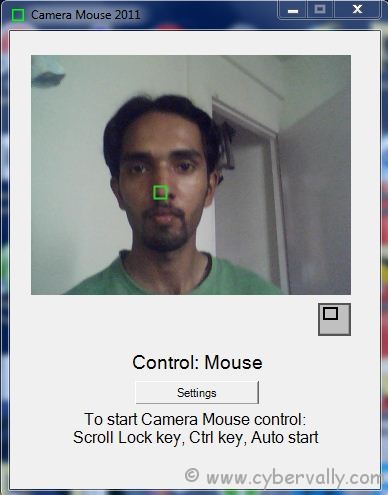
4) After that, Minimize Camera Mouse software and press ” Ctrl ” button for start camera mouse. When you move your face, Camera Mouse will move the mouse cursor accordingly on-screen.
5) For click on something, just hold your mouse cursor on that part for some time, and it will do a single click. For double-click you need to enable double-click function in settings.
By using this tool you can browse the web, play music, and much more. If you want to get the control of physical mouse, you can just move your mouse, and Camera Mouse will stop its working.
[Download Camera Mouse]
If you’re a Facebook user and want to keep up on the latest Technology news why don’t you join the CyberVally Facebook page?
If you enjoyed reading this post, please consider leaving a comment below or subscribing to the feed


i want source code.