


The basic use of having Geo location feature is that the browser will be able to communicate the location of the computer to the website which will then generate results based on the location. For example, if you are searching on Google, Google will preferentially show you search results based on your location. If you are looking more about your privacy, you can control IE 9 and Firefox 4 not to send this information to any web site, just by disable the feature. To turn off this feature, just follow below procedure.
For Internet Explorer 9
1. Open IE 9.
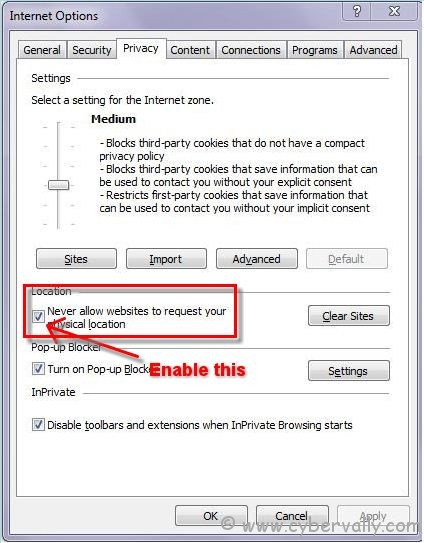
2. Go to Tools -> Internet Options -> Privacy.
3. Now, Mark box against ‘Never allow web sites to request your physical location’ and click OK to save the settings.
For Firefox 4
1. Open Firefox.
2. Go to the address bar and input about:config.
4. Click the I’ll be careful, I promise! button.

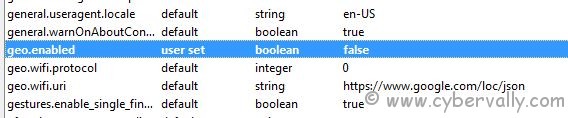
5. Locate and then double-click geo.enabled.
6. The value will change from true to false.
7. Restart your browser.
That’s all; you have successfully disabled location related browsing.
If you’re a Facebook user and want to keep up on the latest Technology news why don’t you join the CyberVally Facebook page?
If you enjoyed reading this post, please consider leaving a comment below or subscribing to the feed

