

How-ToInternet

How to View Garbled Messages in Gmail

Emails your are getting in your inbox are encoded by sender. Gmail determines type of encoding used by Sender and then displays the message.If Gmail is unable to accurately detect the encoding of message, then Gmail can’t display the message properly. The message will appear as garbled. Gmail made a solution for viewing garbled messages in your inbox. Only some simple steps to view message.
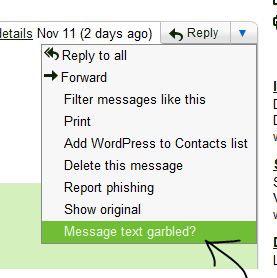
Steps to open Garbled Message

  • Open garbled message in your inbox.
  • Click down arrow next to reply and click ” Messege text grrbled ? “
  • Garbled messege will come another window in text format.
  • Now you can read complete mail in text format.

Hope it is useful for you. Share your comments and quires about it in the comments box below  😀

About author

Articles

Arun Wilson is a self-confessed tech and gadget freak. When he isn't busy navigating life, he loves sharing the latest updates on technology, internet security, and new gadgets. Connect with Arun: Follow on X | Facebook
Related posts
How-ToInternetLatest Updates

Building Your Own Private Cloud: A Raspberry Pi Home Storage Solution

In an age where data privacy and control are increasingly important, relying solely on commercial…
Read more
How-ToInternetLatest Updates

Unlock Your Reach: How to Drive More Traffic and Views to Instagram Reels

Instagram Reels have exploded in popularity, offering a dynamic way to share short, engaging video…
Read more
How-ToInternetLatest Updates

How to Build Your Own Private VPN Server Using Home Wi-Fi

Setting up a private VPN network using your home Wi-Fi can be a great way to secure your internet…
Read more