

Latest version of Skype allows you login into Skype using your existing Facebook or Microsoft (Hotmail, Live or Outlook) account. You can start using Skype with login details of existing Facebook or Microsoft accounts. This feature is only available in new version Skype 6.0 or above. This makes it even easier to connect with friends on Skype without having to set up another account in Skype.
Here’s How to Enable this Feature
This feature is only available for Skype version 6.0 + only. If you have older version of Skype then you need to update.
1. Goto Help > About to check version of Skype. If the listed version is below 6.0 then goto Help > Check for updates to update Skype software to the latest version.
Also, new Skype users can simply download the latest version from Skype.com/download
2. After successful version upgrade, you should see new Skype login window. Besides usual Skype login box, there are buttons for Microsoft and Facebook accounts.
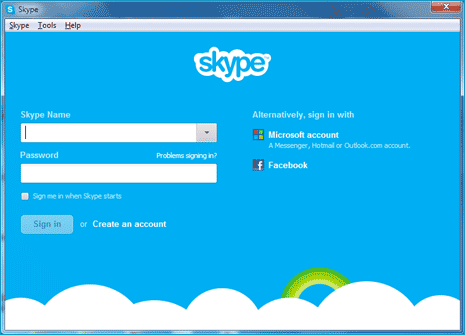
3. To login using Facebook account, click on Facebook button. Enter your existing Facebook account login details for logging into Skype. Then you should see existing or new user options, click on new user option to complete setup for login into Skype using Facebook account.
Using same login procedure you can login and use Skype using Live, Hotmail or Outlook.com accounts from Microsoft. This is more helpful for existing Facebook and Microsoft users and no need create new account for chat with your loving friends.
We value your comments. Feel free to discuss here any ideas. Share this information with your friends.
You can follow us on Twitter or join our Facebook fan page to keep yourself updated on all the latest from Microsoft, Google and Apple.

