


How-To

How Find 3G Coverage in Your Area

Before taking any 3G connection, it is important to find out whether the 3G network exists in your area or not. To get  3G service, your 3G enabled handset must have access to a UMTS tower (Universal Mobile Telecommunication System) which is different from the regular 2G mobile tower.

A simple trick help you to find out if 3G network exists in your area or not.
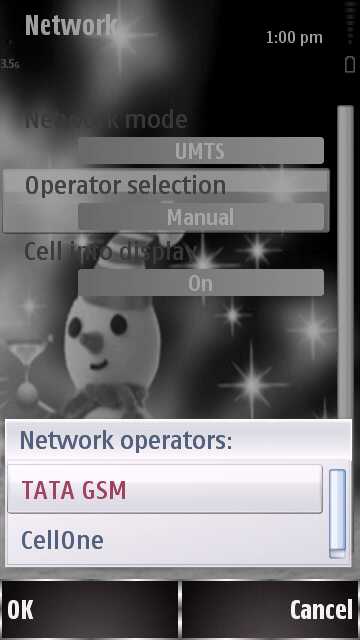
  • Get your 3G handset and visit the Network menu [ example – Nokia ]
  • Go to Settings – Connectivity.
  • Select network
  • Change  Network Mode to UMTS or 3G
  • Select Manual under the Operator selection.
  • Wait for your mobile to search for any available UMTS signals.
As the figure shows, I have TATA GSM and Cellone signal in my area. If you don’t get any network, it  means that your area is not covered under the 3G network.

If you enjoyed reading this post, please consider leaving a comment below or subscribing to the feed 😀

About author

Articles

Arun Wilson is a self-confessed tech and gadget freak. When he isn't busy navigating life, he loves sharing the latest updates on technology, internet security, and new gadgets. Connect with Arun: Follow on X | Facebook
Related posts
How-ToInternetLatest Updates

Don't Toss It! How to Turn Your Old Wi-Fi Router into a Repeater

We’ve all been there: you upgrade to a shiny new Wi-Fi router to get better speeds, and your…
Read more
How-ToInternetLatest Updates

Building Your Own Private Cloud: A Raspberry Pi Home Storage Solution

In an age where data privacy and control are increasingly important, relying solely on commercial…
Read more
How-ToInternetLatest Updates

Unlock Your Reach: How to Drive More Traffic and Views to Instagram Reels

Instagram Reels have exploded in popularity, offering a dynamic way to share short, engaging video…
Read more