

 Normally you archive or delete an email message, you are sent back to inbox window by default in Gmail.In other email services like Yahoo Mail, Hotmail deleting an email message opens next email message conversation automatically. Now you can also customize Gmail to get same feature to automatically open next email message conversation instead of going back to inbox.
Steps To Setup
- In gmail goto Settings > Labs.
- Enable ‘Auto-advance’ option and click ‘Save Changes’ button at the bottom.
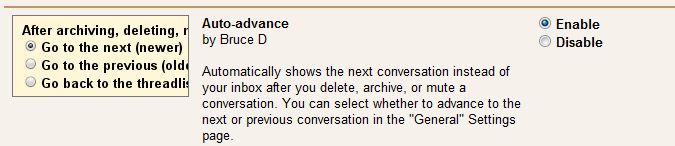
- Goto settings ‘General’ tab on Settings page and look for ‘Auto Advance’ settings’.
- Select any of the following option
- Go to the next (newer) conversation
- Go to the previous (older) conversation
- Go back to the threadlist

- Settings done
Now check your messages , for disable this service go to labs and disable Auto-advance service.
Hope it is useful for you. Share your comments and questions about it in the comments box below :- )

