


One of the most popular features on Facebook is tagging, which gives you the ability to identify and reference people in photos, videos and status. In Status tagging, you can tag any of you friend on Facebook to your status update. This feature is quite similar to @replies on Twitter. When you tag someone in your Facebook status, you can show everyone activities you are doing together.
Steps to Setup
1. Go to status update window.
2. To tag a person or a fanpage in you status, just use ‘@’ symbol followed by the name of the person or the page.
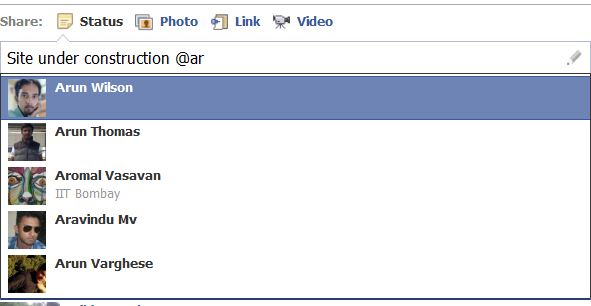
3. Facebook will auto generate a list based upon what you have typed from your friend list.
4. Select the friend that you want to link in you profile.
Many of you Facebookers might already be knowing about this feature but there are still some of them who are not known to tagging feature in Facebook and can be helpful.
If you enjoyed reading this post, please consider leaving a comment below or subscribing to the feed 😀

