

HostsMan is a free Hosts File Manager for Windows. This application will help you to quickly and easily manage your Windows Hosts File. Once you installed, Hosts File Manager appear in the Taskbar. It also includes a hosts file editor which will allow you to create or delete entries from the hosts file, without having to change file permissions. It has been developed to efficiently manage and edit multiple hosts file without having to manually modify Windows hosts file.
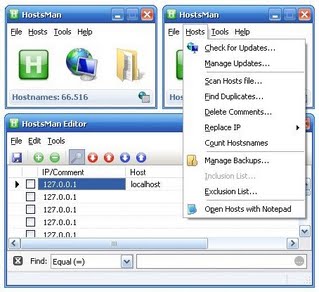
HostsMan Features
- Automatic update of hosts file
- Enable/Disable hosts file
- Built-in hosts editor
- Scan hosts for errors, duplicates and possible hijack
- Hosts file backup manager
- Exclusion list
- Local HTTP server
Requirements
Windows 98SE, Me, NT4 SP6, 2000, XP, Server 2003, Vista, Server 2008, Windows 7
[Download HostsMan for Windows]
You can follow us on Twitter , Google+ or join our Facebook fan page to keep yourself updated on all the latest from Microsoft, Google and Apple.

