

How-ToInternet

How to View Garbled Messages in Gmail

Emails your are getting in your inbox are encoded by sender. Gmail determines type of encoding used by Sender and then displays the message.If Gmail is unable to accurately detect the encoding of message, then Gmail can’t display the message properly. The message will appear as garbled. Gmail made a solution for viewing garbled messages in your inbox. Only some simple steps to view message.
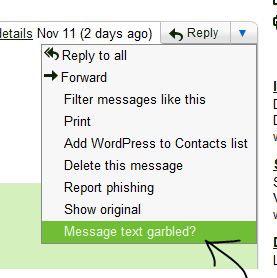
Steps to open Garbled Message

  • Open garbled message in your inbox.
  • Click down arrow next to reply and click ” Messege text grrbled ? “
  • Garbled messege will come another window in text format.
  • Now you can read complete mail in text format.

Hope it is useful for you. Share your comments and quires about it in the comments box below  😀

About author

Articles

Arun Wilson is a self-confessed tech and gadget freak. When he isn't busy navigating life, he loves sharing the latest updates on technology, internet security, and new gadgets. Connect with Arun: Follow on X | Facebook
Related posts
InternetLatest Updates

Beyond Passwords: A Guide to the Different Types of 2-Factor Authentication

If your online accounts were a house, a password would be the lock on the front door. It keeps…
Read more
How-ToInternetLatest Updates

Don't Toss It! How to Turn Your Old Wi-Fi Router into a Repeater

We’ve all been there: you upgrade to a shiny new Wi-Fi router to get better speeds, and your…
Read more
InternetLatest Updates

Top 5 Secure Applications for Sending Messages from Mobile

In today’s hyper-connected world, our smartphones are more than just communication devices; they…
Read more