

Do you want to save web pages as pdf for access later from anywhesre? If you want to save a webpage same as what it appears on the website, then save such webpage into a pdf file is the right solution. A new feature added to Chrome has giving these benefits to the users with integrated Google Cloud Print in Google Chrome. Using this feature you can able to save or convert web pages as PDFs in your Computer or to your Google Drive account so that you can always access that document from anywhere from your Google Drive.
How to save web page as PDF to Google Drive
1. Sign into your Google account.
2. Open web page which one you want to print and press ” Ctrl + P “
3. In printer selection window click on ” change destination”
4. Under Google Cloud Print select save to Google Drive and click on Save button under Print on top-side left of the page.
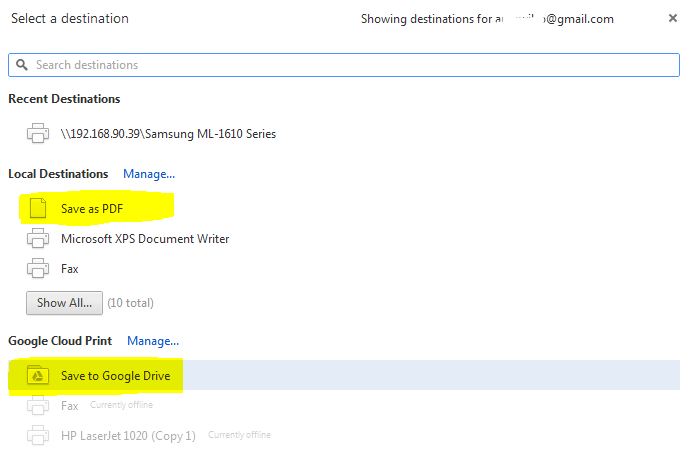
Now your page will be converted and saved to PDF in your Google drive which will be appear in Google Drive.
We value your comments. Feel free to discuss here any ideas. Share this information with your friends.
You can follow us on Twitter or join our Facebook fan page to keep yourself updated on all the latest from Microsoft, Google and Apple.

