

Facebook is a most popular social networking website where people are connected with friends and family.Your online friends sometimes disturbs you through Facebook chat ? . Facebook doesn’t allows to appear offline to selected persons but using this facebook trick you can appear offline to specific person on chat .
Steps to Create Chat Block List
1) Go to Chat Box that is found at the lower right side of the page and then, click on Friends List. A small window will appear, where you will be able to create a new list.
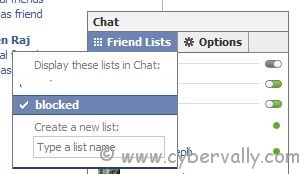
2)  Click “Chat†on the bottom right again and then “Friends Lists†to reach to the list you had just created. Click on the ‘edit ‘ link adjacent to your newly created list . A small window pops up showing all friends. Select the friends whom you want to appear offline or invisible.
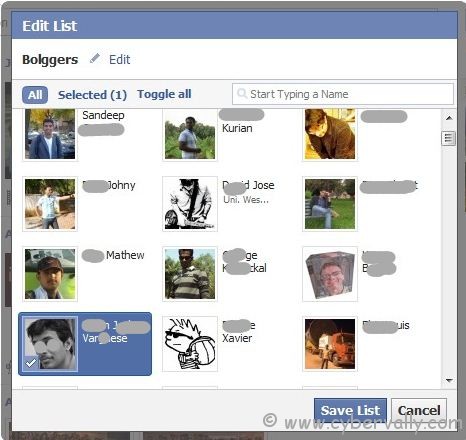
3) Click on Save list.
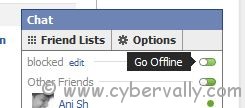
4) Open your chat window, and you will see your newly created List. Just click on the small capsule like half green status icon adjacent to the List name. The green color will change to Grey.
How to delete the created list ?
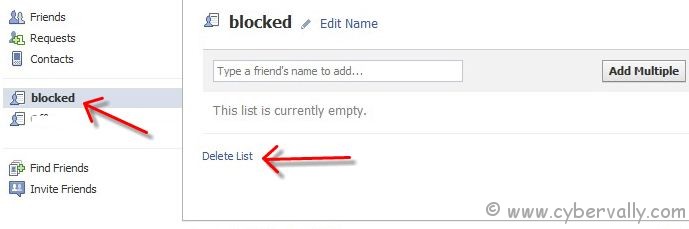
1) Go to Friends->Edit Friends
2) Created list will be shown at the left side menu. You can see the ‘Delete List’ option at the bottom
If you’re a Facebook user and want to keep up on the latest Technology news why don’t you join the CyberVally Facebook page?
If you enjoyed reading this post, please consider leaving a comment below or subscribing to the feed


Nice One
Ya, its very useful for everyone…