


Microsoft launched its IE 9 RC version on last week. Check its features before you actually test it. IE9 RC supports Geo location and enables a web application/web site to access your geographical location of the PC running IE9. IE9 uses Microsoft service that uses your IP address and near by Wi-Fi access points to determine your location. If you want disable Geo location in IE9, follow below steps to do it.
Disable Geolocation in IE9
1. Open Internet Explorer, click Tools>Internet Options> click Privacy tab
2. Under Location select “Never allow website to request your physical locationâ€, click “ Clear Sites† and click Apply followed by OK to save changes.
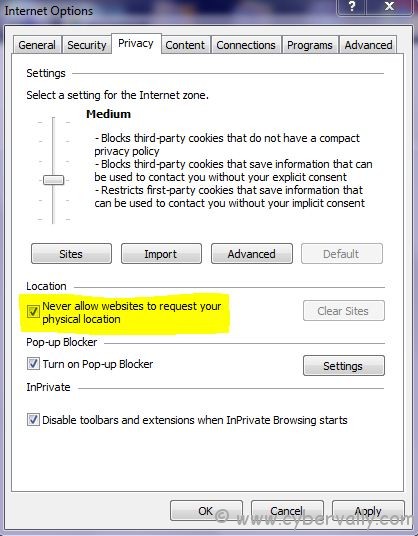
Now IE9 won’t track your location t websites from now on.
If you’re a Facebook user and want to keep up on the latest threats and security news why don’t you join the CyberVally Facebook page?
If you enjoyed reading this post, please consider leaving a comment below or subscribing to the feed


3 Comments