


Social network giant Facebook  has unveilled a new messaging solution that combines elements of email, SMS, and instant messaging. The only problem is that if you need to send some one free SMS, they must be registered with facebook & must have a mobile verified account.
How to Register Mobile Number With Facebook
Step 1: Â SMS the letter F to 9232232665
Step 2: Open http://www.facebook.com/mobile/?settings in your browser.
Step 3: Check your mobile, You should have received an SMS with a confirmation code.
Step 4: Now again go to your browser & click on Already received a confirmation code?
Step 5: Now you got a mobile verified account in facebook.
How to Send Free SMS to Friend
Step 1: Â Click on the messages Icon right next to the facebook logo
Step 2: Click on the send a new message link as highlighted below.
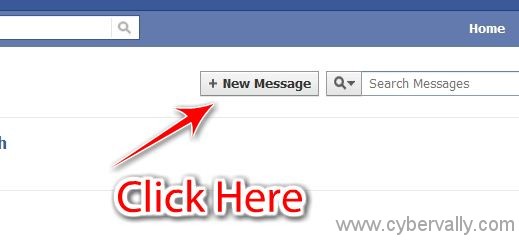
Step 3 : As shown in below, Type the name of your friends whome you want to message and mark on the mobile phone icon above the Send Button.
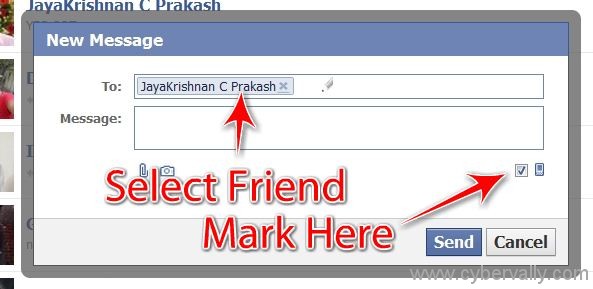
If your friend has verified his phone on facebook, You will be able to send him unlimited free SMS from Facebook.
If you enjoyed reading this post, please consider leaving a comment below or subscribing to the feed 😀


Ohh its mee .. yooo!!!
Ya.. its u….
Really Your Post is very good and helpful. i am very happy to read your post. Keep update I will return soon.
ThanksÂ