

Google is now offering to merge two Google Plus accounts together which means transfer and merging two different accounts together in order to cope your friends and circles. This feature comes useful for people who have multiple Google Plus profiles like personal and business.Before transferring, you need to decide which is source and which is destination account. After transferring process the source profile will be replaced by the destination’s profile. After the initiation it will take 7 days to transfer account. In this time you can also cancel transfer request if it not started. This feature is available through Google Takeout service.
1. log in to Google Takeout with your source account.
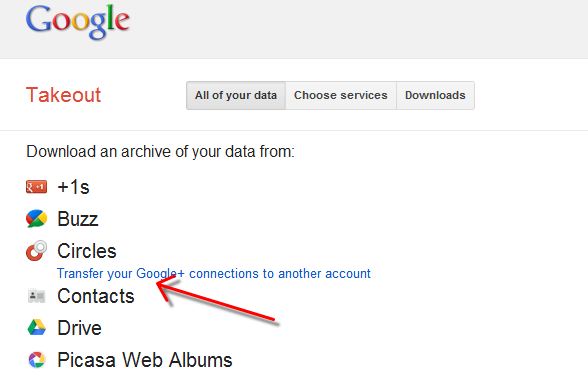
2. After you logged in with your source account, you could see an option of “Transfer your Google+ connections to another account”.
3. Enter the email to which you want to transfer your data. So type your destination email id and sign in.
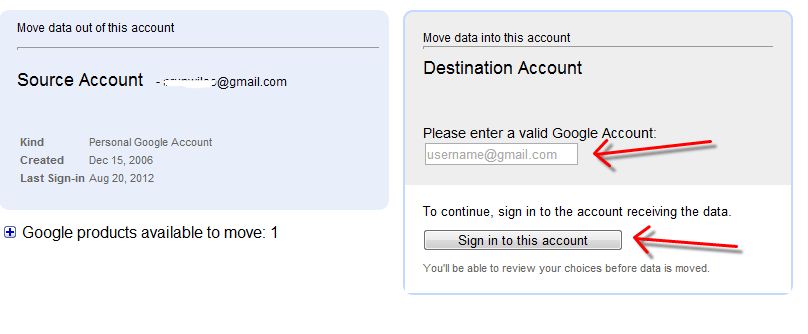
4. Verify your the information for both profiles then click Transfer to start the transfer.
5. The transfer will be done in the next 7 days. You’ll receive an email in your Source email account.
6. If you want to cancel, please login your account and click on the Cancel Transfer at the bottom of the page.
After the Transfer Your Account
1. after the account transfer,Circles, Blocks and Ignores will be copied from the Source account to the Destination account. The circles in the source account will be transferred, while the circles with the similar names will be merged.
2. you will not get your comments, posts as well as profile information in the destination account.
3. Google+ pages associated with Source will also not be transferred to Destination.
We value your comments. Feel free to discuss here any ideas. Share this information with your friends.
You can follow us on Twitter or join our Facebook fan page to keep yourself updated on all the latest from Microsoft, Google and Apple.


Very useful indeed. Its just what I needed. Only wish there was something we could do to speed up the transfer wait!