

 If you are trying to upload large files like any movie or Software on internet is not easy.So we needs to split the large files into small small parts is a better option for uploading large files. Here is a tool for people who usually send large files through email, considering the memory limit of attachments.
By Using Winrar you can split any big files in any size you want. It split large files into many parts with extension rar.When you extract the file 1st part takes all the remaining parts by itself and join it again.
Steps To Split File
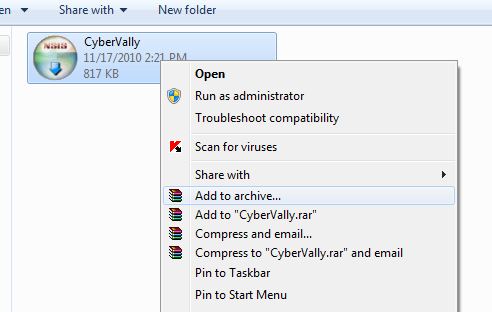
- To start splitting, Right Click on the file that you want to split, choose the option Add to archive
- You will be given a window where you can rename the archive, the option to split the archives into specific files sizes, enter the desired maximum size of each file.
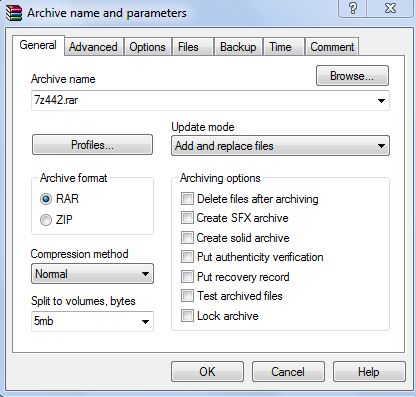
- Click Ok and wait for few seconds.
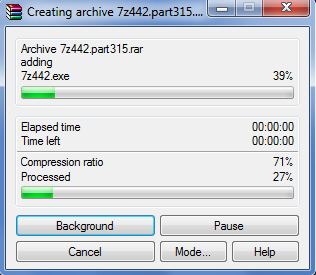
- WinRar compress the source file and splits it in to several files.
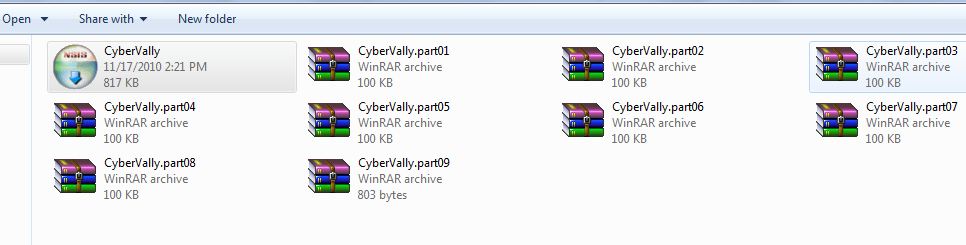
- You can then attach each of this to an email or upload to internet.
Hope it is useful for you. Share your comments and questions about it in the comments box below 😀


Another favorite option is File Apartment (http://www.fileapartment.com). Easy to use, fast, no software to download or registration, up to 1 GB, free option, safe, and secure.