

Mozillla Firefox is an excellent browser for an internet users. In firefox 4 you can create a master password to protect all your passwords stored in the browser. Â When you register to any kind of web pages Mozilla Firefox will want to remember this password and next time when you enter your user name it automatically fill you password space. This will help Mozilla Firefox users don’t need to insert your password every time you log in.

How to  Setup Master Password
1) Open Firefox browser and click the Firefox tab on top left side.
2) Open Options and select Options.
3) Select “Security†form the window. You can see the  “ Use master passwordâ€, tick the  check box , which pop’s up a window to set the master password.

4) Enter the password and confirm it and click ok.
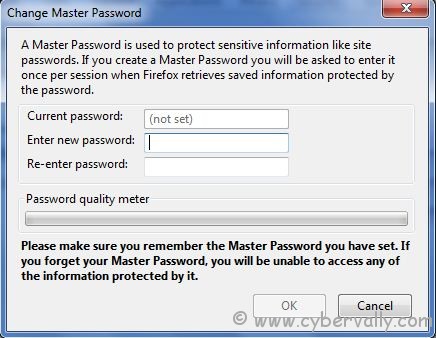
5) Now check any webpage where you set to remember password, you will see a window pop up asking you to enter the master password in order to proceed.
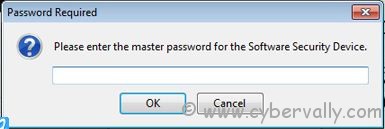
If you forgot your master password ,you will be unable to access any of information. So remember your master password always.
If you’re a Facebook user and want to keep up on the latest Technology news why don’t you join the CyberVally Facebook page?
If you enjoyed reading this post, please consider leaving a comment below or subscribing to the feed

