


In internet world we are using so many usernames and passwords in diffrent sites. If you have forgotten the login username and password for a web site, then do not worry. There is one tool will be able to recover the forgotten passwords from the password storage of Google Chrome browser.
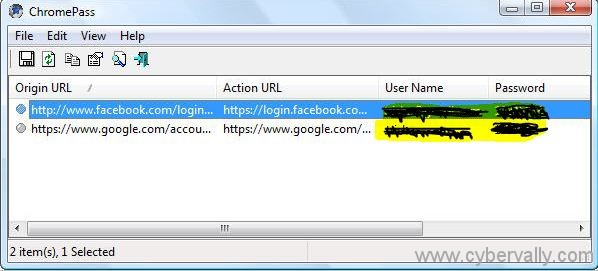
ChromePass is a small password recovery tool that allows you to view the user names and passwords stored by Google Chrome Web browser. For each password entry, the following information is displayed: Origin URL, Action URL, User Name field, Password field, User Name, Password, and Created Time. ChromePass works for all the versions of the Google Chrome browser. You can select one or more items and then save them into text/html/xml file or copy them to the clipboard.
Steps to Setup
– Download the ChromePass from Here.
– Close all the open Chrome browser windows.
– Double Click and Run the chromepass.exe file present inside the downloaded ZIP archive.
– You will see the ChromePass window with a list of all the found usernames, passwords as shown.
If you enjoyed reading this post, please consider leaving a comment below or subscribing to the feed 😀

