

InternetLatest Updates

Recover Lost Wireless Network Key Using WirelessKeyView

Forget wi-fi network password key that stored on your Windows computer. Don’t worry, there is a small free utility called WirelessKeyView allows you to view saved wireless network keys in plain text.
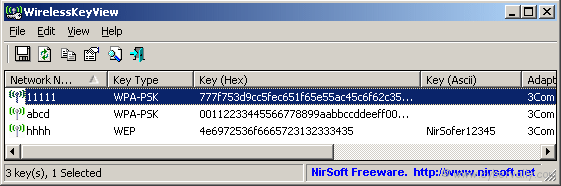
WirelessKeyView recovers all wireless network keys (WEP/WPA) stored in your computer by the ‘Wireless Zero Configuration’ service of Windows XP and by the ‘WLAN AutoConfig’ service of Windows Vista. This tool can retrieve both WEP and WPA wireless network keys and even allow you to output the results to HTML so you can save or print them out.

System Requirement

– Windows XP with SP1 or greater.

– You must login to windows with admin user.

[Download Wi fi Key View Here]

If you’re a Facebook user and want to keep up on the latest security news why don’t you join the CyberVally Facebook page?

If you enjoyed reading this post, please consider leaving a comment below or subscribing to the feed

About author

Articles

Arun Wilson is a self-confessed tech and gadget freak. When he isn't busy navigating life, he loves sharing the latest updates on technology, internet security, and new gadgets. Connect with Arun: Follow on X | Facebook
Related posts
ElectronicsLatest UpdatesMobile

Samsung Galaxy S26 Series Explained: Everything You Need to Know Before Buying

Samsung has officially entered the “Agentic AI” era with the launch of the Galaxy S26…
Read more
How-ToInternetLatest Updates

Building Your Own Private Cloud: A Raspberry Pi Home Storage Solution

In an age where data privacy and control are increasingly important, relying solely on commercial…
Read more
How-ToInternetLatest Updates

Unlock Your Reach: How to Drive More Traffic and Views to Instagram Reels

Instagram Reels have exploded in popularity, offering a dynamic way to share short, engaging video…
Read more

1 Comment

Comments are closed.