

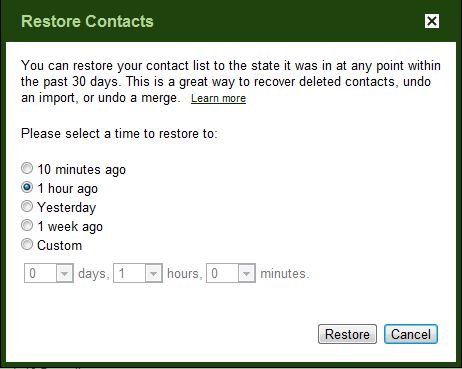
 Gmail has introduced one great feature in contacts which restores your contact list to a recent date if you have accidentally deleted a couple of contacts and want to get them back in your address book.You can restore contacts list to any previous time like 10 minutes ago, 1 hour ago, yesterday, 1 week ago or specific date. This feature is similar to what Windows Restore and Apple Time Machine does.
Steps to Setup
1. Go to your Gmail account.
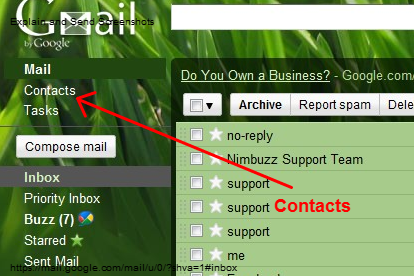
2. Click on Contacts located at the left side just below the Gmail logo.
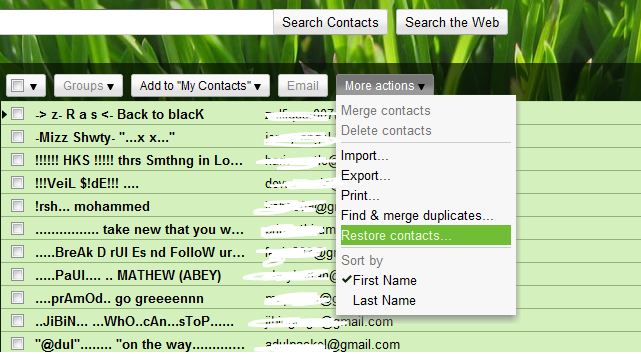
3. Now you will have list of all the contacts before you, click on More actions.
4. In More actions drop down menu click on Restore Contacts.
5. Now you would be on Restore Contacts page which would just look like 10 minutes ago, 1 hour ago, yesterday, 1 week ago or specific date.
6. Done. Check your contact list now.
If you enjoyed reading this post, please consider leaving a comment below or subscribing to the feed 😀


Wow! Good tip! I actually did this a few days ago and was going crazy to figure out how to undo my mistake. I found this post very helpful and even better it works! Thanks for sharing!
Take care,
Jeff
http://www.reydean.com/blog