

Google released an update for its Chrome browser that integrated Do Not Track in the web browser. This feature enables users to block third party tracking sites including advertising networks, analytic services and other social platforms. Latest version of Chrome 23 Stable has an option to send a Do Not Track header with connection requests. However websites are free to accept or ignore this request. Most of the sites accept this setting in a user’s web browser.
How you can enable the do-not-track feature in Google Chrome
- Go to the menu button on the top right and select Settings from the context menu.
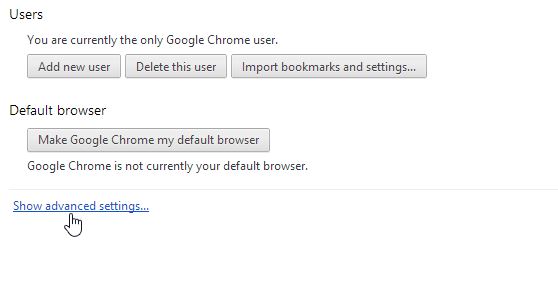
- Click on the Show advanced setting option to view all available options.
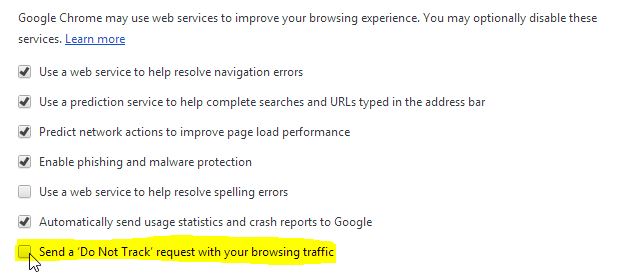
- Now you will see the new “Do Not Track” option, go ahead and check the box to enable it.
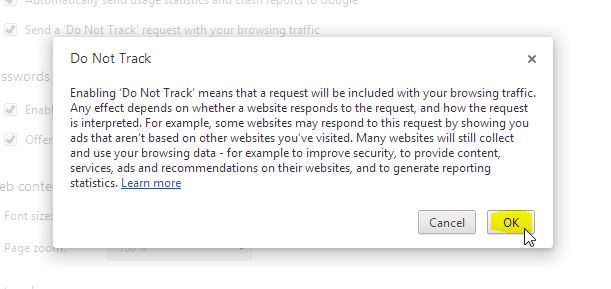
- This displays a help text on the screen that explains the feature. Click ok to activate it, or cancel.
We value your comments. Feel free to discuss here any ideas. Share this information with your friends.
You can follow us on Twitter or join our Facebook fan page to keep yourself updated on all the latest from Microsoft, Google and Apple.

