

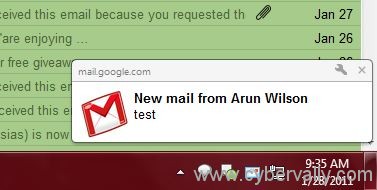
Google has just launched a cool new feature in gmail, by enabling which you can get desktop alerts, pop up message when ever you get a new mail on your gmail or even when you receive a new chat alert when some of your google buddy pings you on gtalk. We will show you how to enable these notifications, follow the procedure below to enable these alerts.
Steps to Setup
1. Login to your gmail account, once you are logged in, go to gmail account settings by clicking settings in the top right corner of the page.
2. Under settings, scroll down to locate section of Desktop Notifications – where you can enable desktop alerts for new mail or new chat or alerts only for important mails.

3. Once you specify these options, click the Save changes button at the bottom center of the page and then you are done.
Note : This functionality is currently only available for people using Google Chrome, In case your notifications are not displayed, add mail.google.com to Popup Exception and restart your browser.
If you enjoyed reading this post, please consider leaving a comment below or subscribing to the feed

