

InternetLatest Updates

How to Enable Set Image as Wallpaper in Google Chrome

Many of your friends uploading diffrent types of funny and amazing digital photos or images from time to time when browsing the Internet. You can save these images and then use them to set as your desktop wallpaper. To reduce the steps of setting images to the wallpaper, and to simplify the process, users of Google Chrome, you can try a simple extension of the Set the picture as wallpaper.

Steps to Setup

1) Install “Set image as wallpaper” Chrome extension

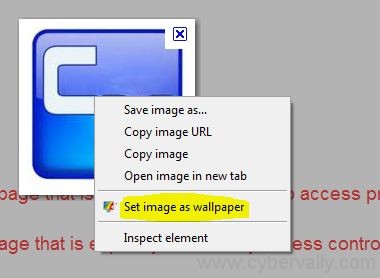
2) Right-click any image on any website and set it as wallpaper on your Windows desktop.

3) Right-click, select “Set as desktop background“
Features

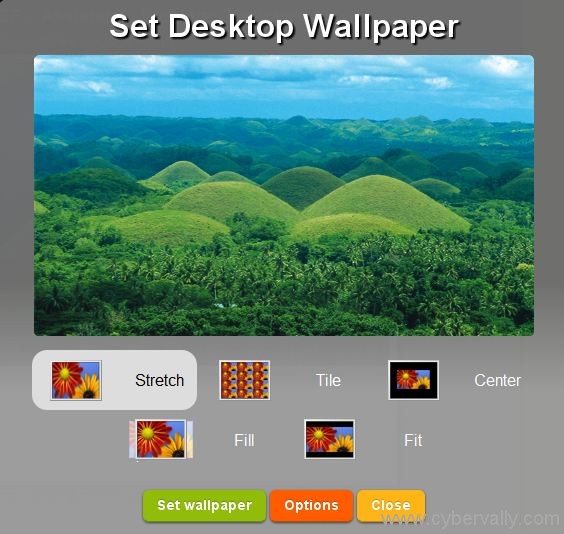
1) HTML5 previewer that shows your wallpaper in exact proportions.

2) Context Menu that hooks up any image on the web, to set it as wallpaper.

3) Stretch, center, tile options to set your wallpaper in the way you want.

4) Add a default previewer position.

[ Download Set image as wallpaper ]

About author

Articles

Arun Wilson is a self-confessed tech and gadget freak. When he isn't busy navigating life, he loves sharing the latest updates on technology, internet security, and new gadgets. Connect with Arun: Follow on X | Facebook
Related posts
ElectronicsLatest UpdatesMobile

Samsung Galaxy S26 Series Explained: Everything You Need to Know Before Buying

Samsung has officially entered the “Agentic AI” era with the launch of the Galaxy S26…
Read more
How-ToInternetLatest Updates

Building Your Own Private Cloud: A Raspberry Pi Home Storage Solution

In an age where data privacy and control are increasingly important, relying solely on commercial…
Read more
How-ToInternetLatest Updates

Unlock Your Reach: How to Drive More Traffic and Views to Instagram Reels

Instagram Reels have exploded in popularity, offering a dynamic way to share short, engaging video…
Read more

1 Comment

Comments are closed.