


ComputerLatest Updates

How to Enable IPv6 On Windows XP

All over the world ISPs are in the process of enabling the IPv6 protocol which is then available for usage in addition to the currently used IPv4 protocol. Windows Vista and Windows 7 users do not need to enable or configure their operating system for IPv6 usage as it is enabled by default.

How to Enable IPv6

Method One

1) Go to ” Run” and type ” CMD ” then press enter

2) Type following commands  separately and press ” Enther ” after each of them

  • netsh
  • interface
  • ipv6
  • install

3) Now you can access the IPv6 properties from the Network Connections windows for a particular network card.

Method Two
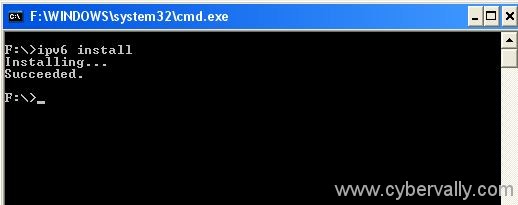

1) Open a Run dialog by pressing Windows Key + R.

2) Type cmd in the Run dialog and press Enter.

3) In the command prompt window, type ipv6 install and press Enter. You would see that IPv6 is being installed.

4)You can check the IPv6 properties from the Network Connections windows for a particular network card.

About author

Articles

Arun Wilson is a self-confessed tech and gadget freak. When he isn't busy navigating life, he loves sharing the latest updates on technology, internet security, and new gadgets. Connect with Arun: Follow on X | Facebook
Related posts
ElectronicsLatest UpdatesMobile

Samsung Galaxy S26 Series Explained: Everything You Need to Know Before Buying

Samsung has officially entered the “Agentic AI” era with the launch of the Galaxy S26…
Read more
How-ToInternetLatest Updates

Building Your Own Private Cloud: A Raspberry Pi Home Storage Solution

In an age where data privacy and control are increasingly important, relying solely on commercial…
Read more
How-ToInternetLatest Updates

Unlock Your Reach: How to Drive More Traffic and Views to Instagram Reels

Instagram Reels have exploded in popularity, offering a dynamic way to share short, engaging video…
Read more