


InternetLatest Updates

How to Disable Geolocation in Internet Explorer 9

Microsoft launched its IE 9 RC version on last week. Check its features before you actually test it. IE9 RC supports Geo location and enables a web application/web site to access your geographical location of the PC running IE9. IE9 uses Microsoft service that uses your IP address and near by Wi-Fi access points to determine your location. If you want disable Geo location in IE9, follow below steps to do it.

Disable Geolocation in IE9

1. Open Internet Explorer, click Tools>Internet Options> click Privacy tab

2. Under Location select “Never allow website to request your physical location”, click “ Clear Sites”  and click Apply followed by OK to save changes.
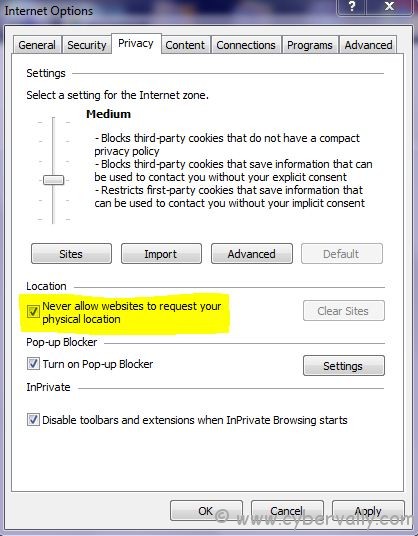
Now IE9 won’t track your location t websites from now on.

If you’re a Facebook user and want to keep up on the latest threats and security news why don’t you join the CyberVally Facebook page?


If you enjoyed reading this post, please consider leaving a comment below or subscribing to the feed

 

About author

Articles

Arun Wilson is a self-confessed tech and gadget freak. When he isn't busy navigating life, he loves sharing the latest updates on technology, internet security, and new gadgets. Connect with Arun: Follow on X | Facebook
Related posts
ElectronicsLatest UpdatesMobile

Samsung Galaxy S26 Series Explained: Everything You Need to Know Before Buying

Samsung has officially entered the “Agentic AI” era with the launch of the Galaxy S26…
Read more
How-ToInternetLatest Updates

Building Your Own Private Cloud: A Raspberry Pi Home Storage Solution

In an age where data privacy and control are increasingly important, relying solely on commercial…
Read more
How-ToInternetLatest Updates

Unlock Your Reach: How to Drive More Traffic and Views to Instagram Reels

Instagram Reels have exploded in popularity, offering a dynamic way to share short, engaging video…
Read more

3 Comments

Comments are closed.