

Last week Instagram disabled the Twitter Integration Card, which means Twitter users are no longer able to view the Instagram Photos within the Twitter. Instagram had taken the decision of disabling the integration card because of the increasing complaints by users.
Check out the Twitter’s official statement about this:
“Instagram has disabled photo integration with Twitter. As a result, photos are no longer appearing in Tweets or user photo galleries. While tweeting links to Instagram photos is still possible, you can no longer view the photos on Twitter, as was previously the case.â€
But for the dedicated Instagram and Twitter users, there’s a extension developed by Dwolla’s Michael Schonfeld for Chrome users, that lets you to bring the Instagram photos back in the Twitter. This extension named InstaTwit works with all Instagram URLs and the only way the extension could be blocked is if Instagram changed the URL structure of images. InstaTwit is the simplest way to get around this problem.
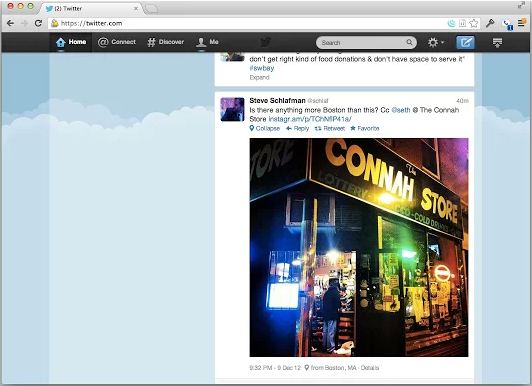
To get started, all you need to do is install the extension, and hit the refresh button on your Twitter window. Instagram photos will now show up as they did “in the good old days”. This extension won’t work for Smartphone and Tablet users but it could be considered as the best alternative for desktop.
To continue enjoying images from Instagram in Twitter timeline, check out the InstaTwit extension in the Chrome Store
 We value your comments. Feel free to discuss here any ideas. Share this information with your friends.
You can follow us on Twitter or join our Facebook fan page to keep yourself updated on all the latest from Microsoft, Google and Apple.

