

New Microsoft Windows 8 has a metro style start screen. In this new windows 8 metro interface you may be noticed that, the old classic start menu not included. But one simple trick help you to enable the old classic start menu that look like on Windows 7 on your windows 8 developer preview by disabling the metro user interface. Follow below steps to enable old start menu in Windows 8.
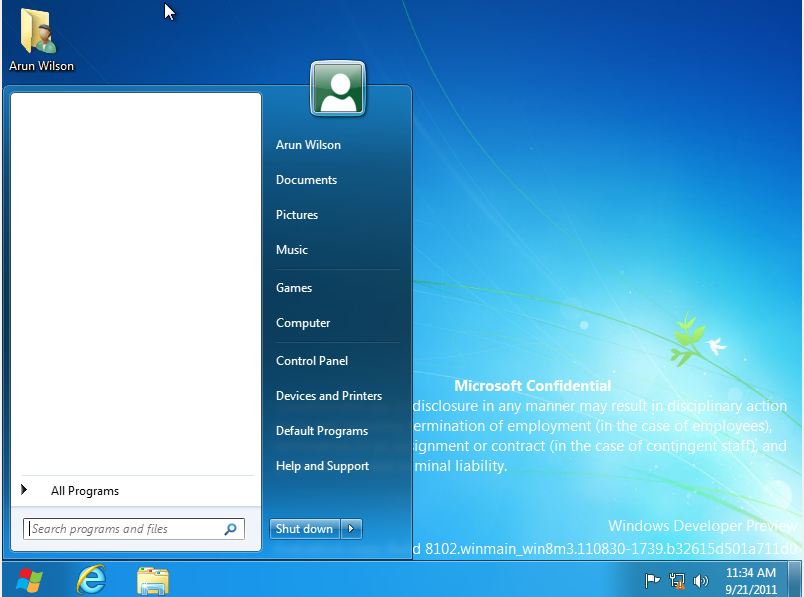
How to Get back the Windows 7 Start Menu in Windows 8
1. Open Regedit (win+r > type ” regedit ” and enter
2. Go to ” HKEY_CURRENT_USER\Software\Microsoft\Windows\CurrentVersion\Explorer “
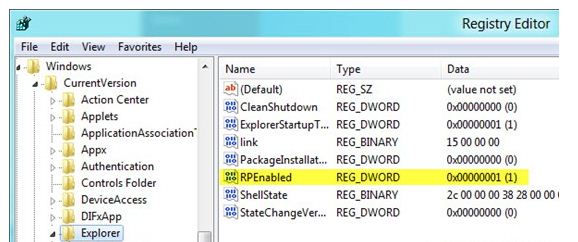
3. Double-click on RPEnabled and change the value from 1 to 0
4) Close Regedit.
After this classic start menu should immediately appear on Windows 8. If you like to revert back to Metro UI, simply follow the above steps and change value from 0 to 1 in Step 3.
You can follow us on Twitter or join our Facebook fan page to keep yourself updated on all the latest from Microsoft, Google and Apple.

