

 In Gmain there is no default option for insert image in to Gmail message window. This is because by default Gmail Rich Formatting doesn’t support inserting images into the message body. If you drag the image to gmail message it will not add it to message body.To slove this problem you need to use a Google Lab Product called  “Inserting Images“. Inserting images is a Google Labs feature which allows users to embed images from computer or by URL to their Gmail messages.Simple steps given below helps you to enable this feature in your gmail account.
Steps To Setup
1. Open your Gmail account.
2. On the top right corner you will find Settings, click on it.
3. Go to Labs in settings window.
4. Search out for ” Inserting images “
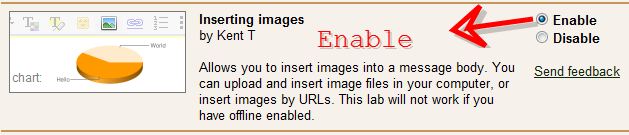
5. Click on Enable to activate this.
6. Now open ” Compose mail ” and check it.
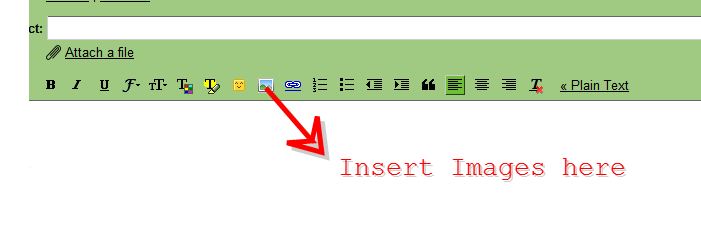 Hope it is useful for you. Share your comments and questions about it in the comments box below. 😀
