

How-ToInternet

How to Add Badges Icons to Your Orkut Profile

Orkut started new feature to spice up your Orkut profile using colorful Orkut badges. There are different types of badges for users that managed by orkut in different ways. You will get Early user badge if you are using Orkut more than 5 year or get Graduate badge if you have a community with more than a million members. You can customize Orkut profile to display badge icons of your own choice.

Steps to Display Badges on Your Profile

  • Click Profile button at the top.
  • Click ‘Add Badges’ link on Orkut profile page.
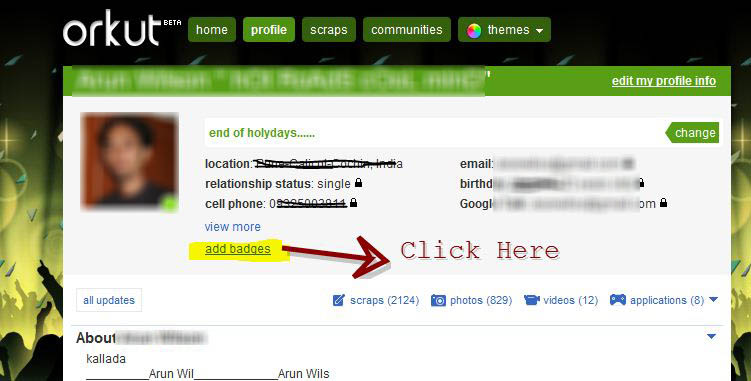
  • Here you can drop badge icons to display on your profile page. If you do not this option, it being rolled out to all Orkut user with in few days.
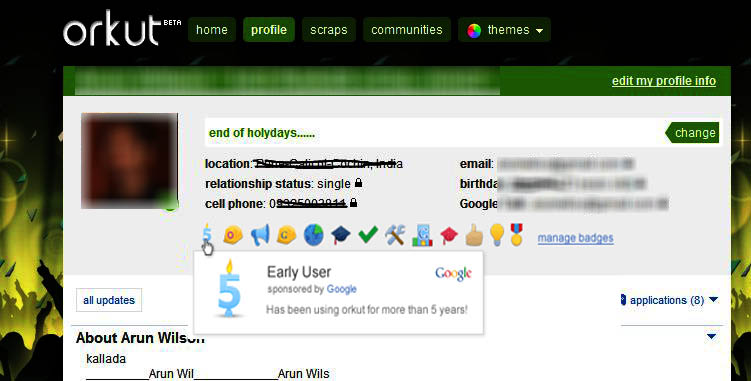
You will get badge icon for your Orkut profile based on your Orkut activity and interaction level.

About author

Articles

Arun Wilson is a self-confessed tech and gadget freak. When he isn't busy navigating life, he loves sharing the latest updates on technology, internet security, and new gadgets. Connect with Arun: Follow on X | Facebook
Related posts
InternetLatest Updates

Beyond Passwords: A Guide to the Different Types of 2-Factor Authentication

If your online accounts were a house, a password would be the lock on the front door. It keeps…
Read more
How-ToInternetLatest Updates

Don't Toss It! How to Turn Your Old Wi-Fi Router into a Repeater

We’ve all been there: you upgrade to a shiny new Wi-Fi router to get better speeds, and your…
Read more
InternetLatest Updates

Top 5 Secure Applications for Sending Messages from Mobile

In today’s hyper-connected world, our smartphones are more than just communication devices; they…
Read more