


Internet

Manage Who Can Send Messages To You On Facebook

The new Facebook Messages Inbox will only contain messages from your friends and their friends. All other messages will go into an other folder where you can look at them separately or you can block unwanted messages.

Steps To Setup Message Control

  • Go to the Account -> Privacy Settings .
  • Click ‘View settings’ in the ‘Connecting on Facebook’ section.
  • Change the setting for ‘Send you messages’. Your options include: Everyone, Friends and Friends of Friends.
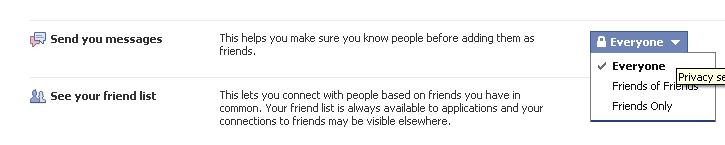
  • Only emails from people that fall within the message privacy setting you choose will be delivered to your Facebook Messages.
  • Changes to the ‘Send you messages’ privacy setting may take up to 24 hours to take effect.
  • keep your privacy and avoid the unwanted messages to your email.

About author

Articles

Arun Wilson is a self-confessed tech and gadget freak. When he isn't busy navigating life, he loves sharing the latest updates on technology, internet security, and new gadgets. Connect with Arun: Follow on X | Facebook
Related posts
How-ToInternetLatest Updates

Building Your Own Private Cloud: A Raspberry Pi Home Storage Solution

In an age where data privacy and control are increasingly important, relying solely on commercial…
Read more
How-ToInternetLatest Updates

Unlock Your Reach: How to Drive More Traffic and Views to Instagram Reels

Instagram Reels have exploded in popularity, offering a dynamic way to share short, engaging video…
Read more
How-ToInternetLatest Updates

How to Build Your Own Private VPN Server Using Home Wi-Fi

Setting up a private VPN network using your home Wi-Fi can be a great way to secure your internet…
Read more