

 There is one features that Microsoft introduced in Windows 7 is Virtual WiFi. Virtual WiFi makes it possible to use the wireless networking adapter of laptop running in Windows 7 as a wireless hotspot for surrounding systems. It is  an interesting feature for  Windows 7 users.
You want to share your internet connection with your friends or home ? Well, you can simply and easily turn your laptop into a wifi hotspot with simple steps. ” Connectify ” – an application that turns your computer into a wifi hotspot, sharing your internet connection with others with no additional hardware, wires, plugs, or chargers.
Setting up Connectify very easy.First download the installation package (smaller than 3MB) and installing it. Configuration consists of setting a Wi-Fi name and password. Internet access can be defined via a simple pop-up window, and ranges from wireless, LAN, or basically any other network on your workstation. In the screenshot, you can see the Connectify configuration mode.
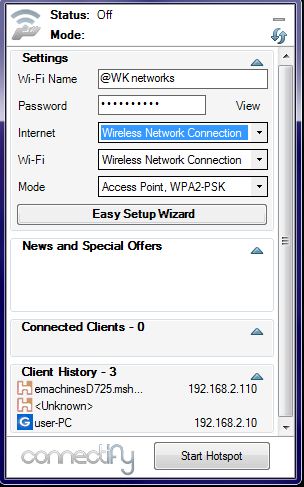
Some features of Connectify
- Select the Internet connection you wish to share.
- Choose a name for your new wireless network.
- Choose a wireless passkey.
- Press the Internet start hotspot button to turn on your wireless network.
- From your other devices, you can see your wireless network. Choose to join it, and enter the wireless passkey to connect.
[ Download Connectify ]
I hope it is useful for all users. Share your comments about it in the comments box below 😀

