

The latest version of Firefox 17 has out of box with new Social API which brings the Facebook Messenger into Firefox and allows you to check Facebook Notifications and chat from the browser on any webpage without opening Facebook in the browser. This new feature will add social network buttons and sidebars in Firefox window so that you can chat with your friends, check messages, notifications, etc quickly and easily. By default this feature is disabled you have to enable it manually. Here is how you turn it on.
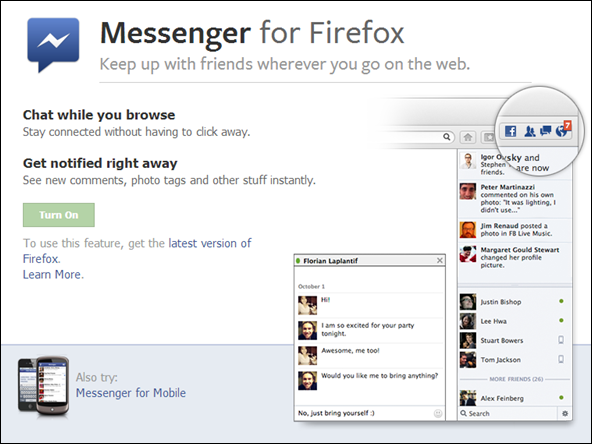
How to Enable Facebook Notifications and Chat on Firefox Toolbar
- Update your Firefox to the latest version, To do this Click on Help > About Firefox, It will automatically start updating itself if its not already updated.
- Go to https://www.facebook.com/about/messenger-for-firefox/. Click on the Big Green Turn On button. You will get the popup on the Firefox near the Google Search Box.
- Now you can see Facebook button on top right of Firefox and you can check Notifications, Message Inbox and Friend Request direct from Firefox Toolbar.
If you don’t want the sidebar you can disable it by clicking Facebook button and unmark “Show Sidebar“
You can also enable it is from about:config and activate the whole social API in Firefox. Here’s how to enable it.
- Open Firefox and type about:config in the addressbar and press Enter.
- Now type social into the search box and look for following boolean keys
social.active
social.enabled
- Double click on it to set the value to true. This will enable Facebook bar on Firefox toolbar.
We value your comments. Feel free to discuss here any ideas. Share this information with your friends.
You can follow us on Twitter or join our Facebook fan page to keep yourself updated on all the latest from Microsoft, Google and Apple.

