

Are you looking for an application that quickly move pre-installed software applications, files and program settings from an old PC to your new computer. PickMeApp a freeware program helps you to copy installed applications from one PC to another. PickMeApp is a portable tool and provides features to capture and transfer installed programs. If you want to format your computer or install another version of windows, then you have to face lengthy software installation process and also you have to use that software CDs.Â
PickMeApps main benefits
-Â Can install an application on several computer with same settings.
– Backup all installed application, its settings and activation information’s.
– Reduce lengthy installation process.
– Reduce commercial license activation time.
How to move programs to another
1) Download PickMeApp from here.
2) After you download double click on PickMeApp.exe file and select its destination folder as your pen drive.
3) Its left hand side shows programs that you already installed in your PC. Select programs that you want to copy.
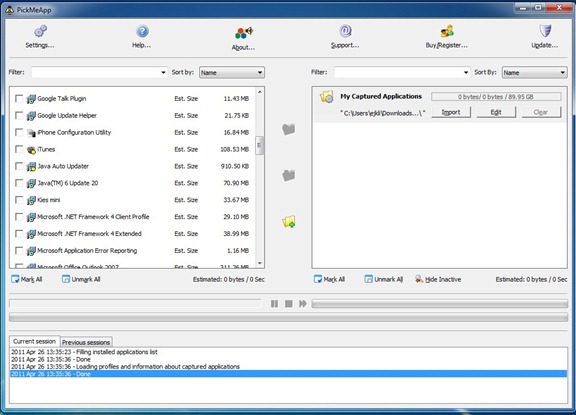
4) Click PickMeApp start button and wait for a few minutes. Process depends on program size. After capture program it display at left hand side.
5) Connect pendrive on another PC and double click PickMeApp exe file. Now you can see captured programs on the left hand side. Select which programs you want to install.
6) Click Install button for start installation process.Â
You can also create personalized package of multiple applications using PickMeApp. PickMeApp also provides command line interface. You need to register for download and use PickMeApp. Each PickMeApp have an unique PickMeApp ID.Â
You can follow us on Twitter or join our Facebook fan page to keep yourself updated on all the latest from Microsoft, Google and Apple.


Be aware that this program bundles crapware with its software which will take over your browser settings and so on. You can (and should) DECLINE those offers during the initial installation.
Followup: Decided to give it a fair try and, with only a couple of exceptions, it only recognized (“captured”) softwares like AMD video drivers and Visual C++ installations – all of which would be easily downloaded and installed.
1/10 stars.