

You can tweet your Flickr images directly from the Flickr website or via your mobile device using a unique email address. You needs follow following steps to enable it in your flicker account.
Step 1:You need to login to your Twitter and Flickr accounts
Once logged in go to the Flickr ‘Blogs’ page: http://www.flickr.com/account/blogs/. Click the set up your blog link

Step 2 :choose ‘Twitter’ and click next.
 Step 3 :Next you have to leave the Flickr site and you are taken to Twitter to ‘authorize’ the set up.
 Step 4 :Once redirected to Twitter click the Allow button
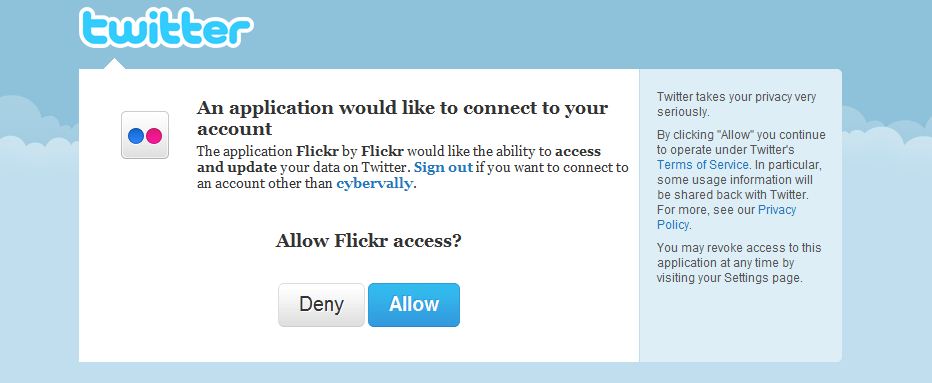
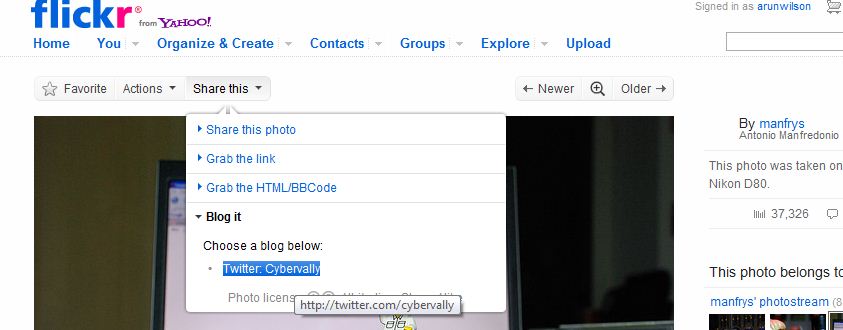
Step 5 :You will be redirected back to Flickr with details that your set up has been successful. Then go to your album and select one photo. In top of photo you can see  ” share this ” option in that option select ” blog it ” with twitter. Now share your photos directly to twitter from flicker account.
Take and share your photos to the world. 🙂

