

Google Chrome is the one of the favorite browser for many peoples. Chrome introdcing new features in every release of its new versions. From Chrome 13 beta verison onwards the browser have a new option called ” Print Preview ” function. It is an awesome option from Chrome. By using this function we can save any web pages or documents as a PDF document directly from Google Chrome. There is no need to install another PDF printer or a browser extension. For that you need to do simple steps.

Steps to Save Web Pages or Documents as PDF
1. Go to Google Chrome and Open web page or document which you want to save as PDF.
2. Right click on any webpage and select “Printâ€. Chrome will open a print optimized version of the webpage or document in a new browser tab.
3. Now select ” Print to PDF ” from destination ( Refer below image )
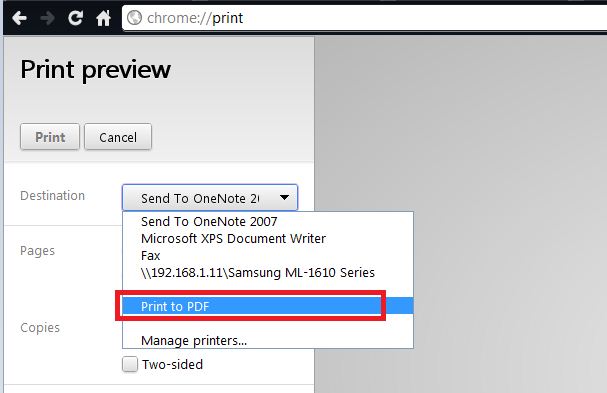
4. Save file to your system.
Note: This option is working fine with latest Chrome 13 stable Channel. If you don’t have Google Chrome 13 stable version, Download from Here
Google Chrome 13 Stable for Windows
Google Chrome 13 Stable for Mac
Chrome 13 Stable for Linux/Ubuntu
You can follow us on Twitter or join our Facebook fan page to keep yourself updated on all the latest from Microsoft, Google and Apple.

