

In this internet world there is a lot of great spammers, spammers are sending out spam mails in bulk. The problem is you get hundreds of spam messages every day. Gmail’s  automatic spam delete option helps you to clean your spam folder automatically. So this is an easier way to keep your mailbox clean by automatically delete the spam mails.
How to delete Spam Automatically from Gmail
1. Log into your Gmail account and then go to Settings.
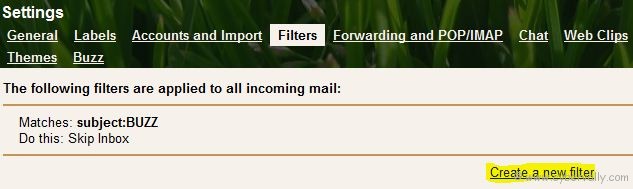
2.Head to the Filter tab to create a new filter then click on “Create a new filterâ€.
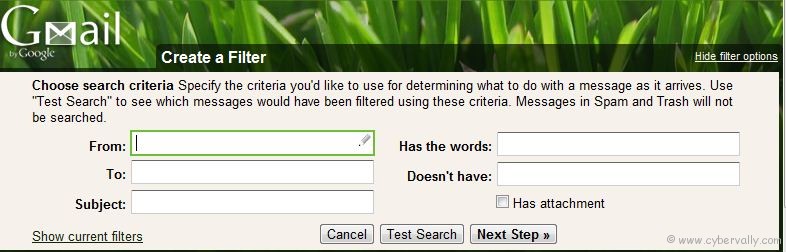
3. In the “Has the words†field, type “is:spam” and click Next Step.
4. You will get a warning message. Simply ignore it and click on OK to continue.
5. Now check into the box Delete it. You can also apply this filter on the existing spam emails in your account by selecting the appropriate option and select Create Filter.
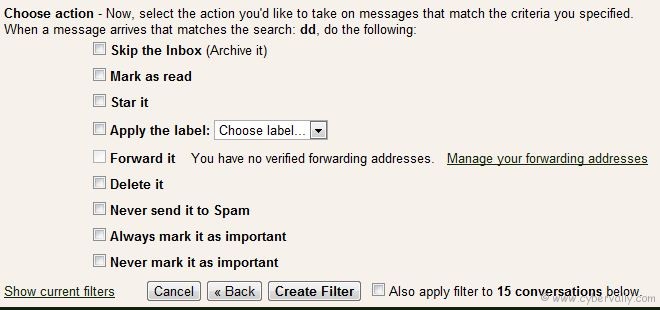
After configure and create the filter properly, all the incoming mails which are flagged as spam will be automatically deleted.
Note: The only draw back of this filter is that every incoming mail that is flagged as spam will be deleted. If Gmail flags an incoming mail as spam by mistake. In this case, you can lose your important mails before you read them.
If you’re a Facebook user and want to keep up on the latest Facebook security news why don’t you join the CyberVally Facebook page?
If you enjoyed reading this post, please consider leaving a comment below or subscribing to the feed

