


Antivirus Antispyware 2011 is an another fake antivirus software and it has several different names. Antivirus Antispyware 2011 is a fake scam program that was made to look like a real security application. The way that Antivirus Antispyware 2011 is able to scam computer users is through deceptive tactics which include displaying misleading virus notifications and system scan results full of dangerous virus programs. This program is installed through Trojans that download and install the program on to your computer without your permission.
Some of the symptoms
– Â installs itself and without user knowledge or permission
– Â connects to the internet without user permission
– Â blocks exe files from running
– Â annoying fake pop-up alerts
– Â unusual system crashes
– Â a dramatic decrease in overall PC functionality
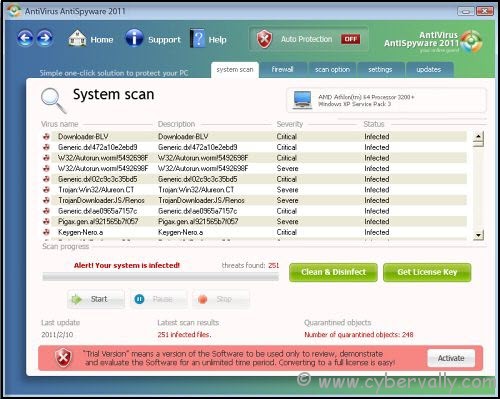
How To Remove Antivirus Antispyware 2011
You need genuine spyware remover to remove antivirus antispyware 2011. You can also remove manually,You need to do everything manually and it is a very hard task. You are required to access sensitive files in oyur PC. Not recommended unless you are an expert in this field.
1. Run your computer in “Safe Mode with Networking†mode. Please note that this virus protects itself in the normal mode, therefore booting up your PC in safe mode is required.
2. Run and type “regedit†and click on OK. This will show registry editor. Please find and delete these registry keys
HKEY_LOCAL_MACHINE\SOFTWARE\AntiVirusAntiSpyware2011
HKEY_LOCAL_MACHINE\SOFTWARE\Microsoft\Windows\CurrentVersion\Run AntiVirus AntiSpyware 2011
3. Locate and delete these infected files and dlls from your computer.
%AppData%\AntiVirus AntiSpyware 2011\securityhelper.exe
%APPDATA%\AntiVirus AntiSpyware 2011\AntiVirus AntiSpyware.exe
%APPDATA%\AntiVirus AntiSpyware 2011\securitymanager.exe
%AppData%\[RANDOM CHARACTERS]\mscjm.exe
%AppData%\[RANDOMCHARACTERS]\recf.exe
%AppData%\AntiVirusAntiSpyware2011\securityhelper.exe
%APPDATA%\AntiVirusAntiSpyware2011\AntiVirusAntiSpyware.exe
%APPDATA%\AntiVirus AntiSpyware 2011\securitymanager.exe
%AppData%\[RANDOMCHARACTERS]\mscjm.exe
%AppData%\[RANDOM CHARACTERS]\recf.exe
%UserProfile%\Start Menu\Programs\AntiVirus AntiSpyware 2011\Activate AntiVirus AntiSpyware 2011.lnk
%UserProfile%\Start Menu\Programs\AntiVirus AntiSpyware 2011\AntiVirus AntiSpyware 2011.lnk
%UserProfile%\Start Menu\Programs\AntiVirus AntiSpyware 2011\Help AntiVirus AntiSpyware 2011.lnk
%UserProfile%\Start Menu\Programs\AntiVirus AntiSpyware 2011\How to Activate AntiVirus AntiSpyware 2011.lnk
4. Restart Computer normally and Install genuine antivirus.
If you’re a Facebook user and want to keep up on the latest Technology news why don’t you join the CyberVally Facebook page?
If you enjoyed reading this post, please consider leaving a comment below or subscribing to the feed

