

1) VPN Connections
A VPN (Virtual Private Network) is a secure method for access blocked sites.It is like a tunnel over the public network. The advantage of using VPNsis that VPNs are more secure because they are using advanced encryption and allow you to access all the applicationsin complete anonymity and not only the web sites. Available free VPN are, UltraVPN and ProXPN.
2) Hide IP Address
Another simple method is hide your IP address form Firewalls. Its main function is to hide IP address and unblock websites, there are many applications avilable for hide your real IP from Internet. Some Free IP Hiding tools, UltraSurf, NotMyIP, IPHider etc.
3) Firefox add-ons

Firefox supporting almost all type of add-ons than any other browsers.FoxyProxy is a small add-on for Firefox that allows users to access blocked sites. Hide IP softwares you can use to access blocked website but you need admin access to install software for access certain blocked sites. For firefox add-on no need of any permissions.
4) Web Proxies

So many free online proxey servers are avilable for access blocked websites. Anonymous proxy is a tool that accesses the Internet through firefox, protecting personal information by hiding the source computer’s informations. So many proxy servers avilable for this type of activity. Some of theme are Proxy.org, HideMyAss.com, Vtunnel.com etc.
5) IP Address of the Website
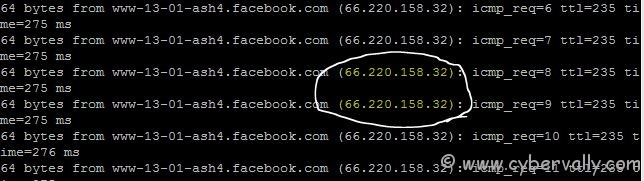
May be some firewall blocking site on the basis of name not IP address. In this case use the IP address of a website instead of URL, you can find IP Address via command prompt. To do this open command prompt and type: “ping site name.comâ€, you’ll get the IP address of the website. Note the IP and put that in browser’s address bar. There no need of any software or add-on for this trick.
If you’re a Facebook user and want to keep up on the latest threats and security news why don’t you join the CyberVally Facebook page?
If you enjoyed reading this post, please consider leaving a comment below or subscribing to the feed


hi
Vpn is the best issue to to access Blocked Websites like facebook and twitter in China or BBC one and Hulu for expat. But Free VPN are very poor. If you want a good speed you need pay (not a lot). I use Overplay VPN and it’s really great. Find more information about vpn and provider in http://www.start-vpn.com/
Use this free proxy website to access Facebook, YouTube, etc when blocked in school or at work.
MaverickEyes.Com
Enjoy.
how to block websites