


Google has launched the availability of Google Cloud Connect to everyone. It is a free plug-in for Microsoft Office 2003, 2007, and 2010. It will add a new toolbar at the top of the Office application with that you can share and edit your Word, PowerPoint, and Excel documents simultaneously with other people you choose by just sending an email with the unique link address that is given to the file, and can be accessed from anywhere, then the recipient can just click the link and open the Office document into Google Docs. Also they can download the file and open it into an Office program on any computer. If you’ve closed a document at the office, you can open it from Google Docs on your home PC and do your modification works and save. They will automatically appear when you open the document at the office the next day.
How to Setup Google Cloud Connect
1) Download Google Cloud Connect and install.
2) After Installation open Microsoft word.
3) Now you can see Google connect toolbar. Login to your Google account and grant access to Word.

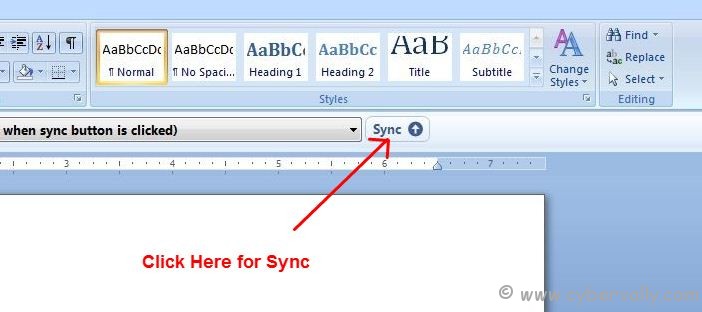
4) Create your word file and Press ‘ Sync ‘ for Synchronize with Google cloud.
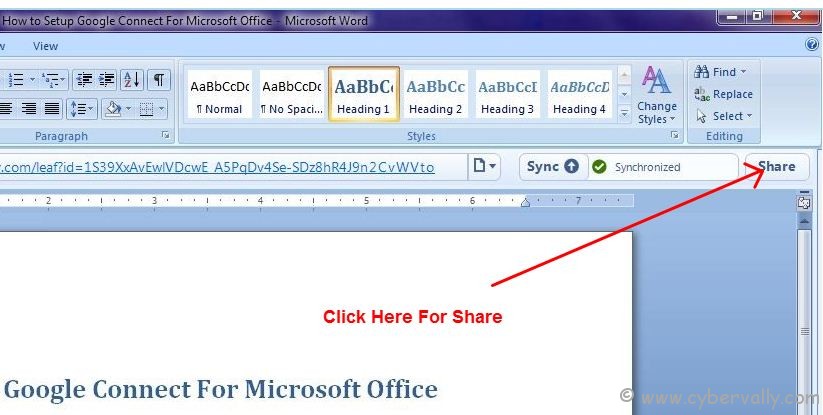
5) After completed process you can press ‘ Share ‘ button in Google cloud connect toolbar for share.
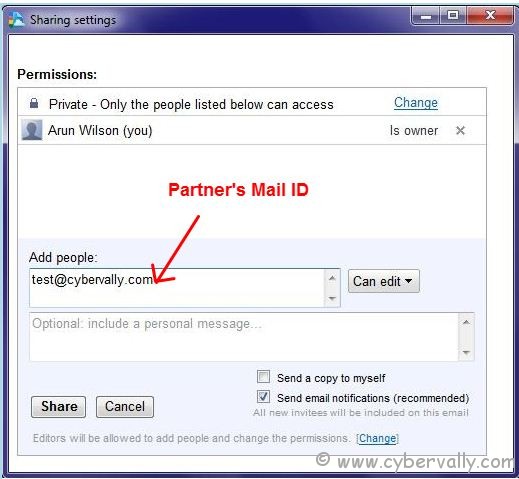
6) In popup window enter the email id of partner and press ‘ share ‘.
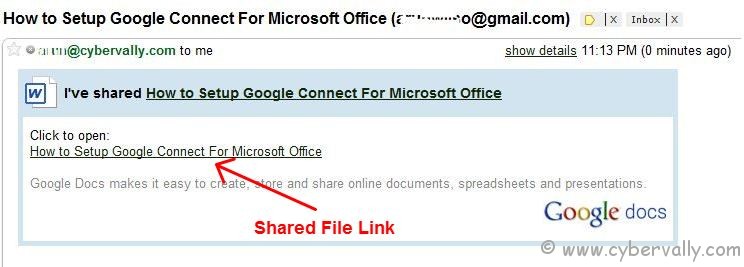
7) Partner will get one mail with Doc link. Click that link to open file in Google Doc.
8 ) Now your file is shared with your partner.  This way you can share your office documents with your  officemates.
If you’re a Facebook user and want to keep up on the latest threats and security news why don’t you join the CyberVally Facebook page?
If you enjoyed reading this post, please consider leaving a comment below or subscribing to the feed

