


Now Facebook is rolling out the option to turn on secure browsing with https protocol. With this option turned on, messages exchanged between your browser and Facebook server will be encrypted. Facebook is making it more and more secure everyday.This way the connection between your computer and the Facebook servers would become encrypted and nobody will be able to hack datas being transferred between you and Facebook. Just follow below steps to enable the secure browsing through HTTPS in Facebook
How to Enable HTTPS
1) Login to your Facebook account.
2) Click on the Account on your top-right and select Account Settings from the drop down list.
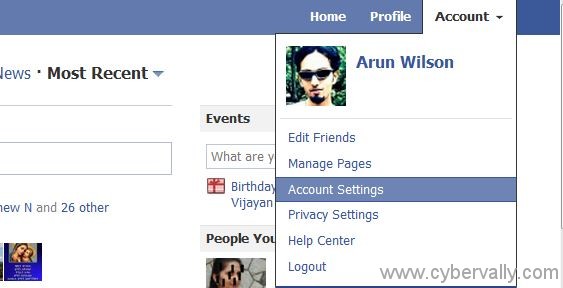
3) Click on the Change option in front of the Account Security as shown.

4) Enable secure browsing HTTPS as shown.
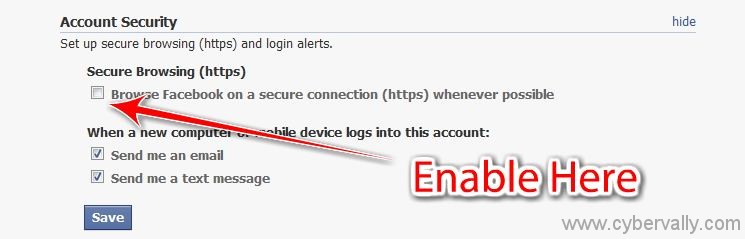
5) Click on Save button to save the settings.
HTTPS Secure Browsing is not available all over the world, but rolling this out slowly over the next few weeks for everyone. After you enable HTTPS secure browsing connection in your Facebook account, the Facebook pages may load slower as HTTPS takes some time to encrypt and decrypt the data being transferred.
Share this post on Twitter and Facebook too. If you enjoyed reading this post, please consider leaving a comment below or subscribing to the feed 😀

