


Internet

Protect Your Google Chrome Browser With Password

If you are more conscious about your private data like username, Password etc. which is saved in your Google Chrome browser.You can password protect chrome browser to make it private and usable by yourself only. A simple add-on for Chrome allows you to password protect your entire chrome browser. You need to install the extension, set the password and lock it.
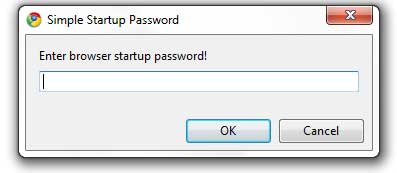
If you put the wrong password the browser will close otherwise you can surf the internet. This prevents unauthorized chrome access.Do not lose or forget your password. There is no option to recover your password. You’ll have to reinstall your browser. If you want to change the password. Go to tools > extensions > simple startup password > options > set or change the password.

[ Download Startup Password Here ]

About author

Articles

Arun Wilson is a self-confessed tech and gadget freak. When he isn't busy navigating life, he loves sharing the latest updates on technology, internet security, and new gadgets. Connect with Arun: Follow on X | Facebook
Related posts
How-ToInternetLatest Updates

Building Your Own Private Cloud: A Raspberry Pi Home Storage Solution

In an age where data privacy and control are increasingly important, relying solely on commercial…
Read more
How-ToInternetLatest Updates

Unlock Your Reach: How to Drive More Traffic and Views to Instagram Reels

Instagram Reels have exploded in popularity, offering a dynamic way to share short, engaging video…
Read more
How-ToInternetLatest Updates

How to Build Your Own Private VPN Server Using Home Wi-Fi

Setting up a private VPN network using your home Wi-Fi can be a great way to secure your internet…
Read more