

Redsnow 0.9.8 which allow you to jailbreak your ios 5 devices. Â To jailbreak ios 5 device, you have to connect the device to a computer so that the device can boot into a Jailbroken state. This Jailbreak will work for the following devices like iPod touch 3G, iPod touch 4G, iPad 1, iPhone3GS, iPhone4 (GSM), iPhone4 (CDMA). Â Also, if your device is not registered then Redsnow 0.9.8 will not work on your device.

You must need UDID registered with Apple’s ios Developer program, An updated firmware ios 5 beta 1, iTunes 10.5 Beta, Redsnow 0.9.8b1 for Mac.
Steps to  jailbreak ios 5
1. Download the version of iOS 5 Beta compatible to your device.
2. Using iTunes 10.5 Beta, update your device to ios 5
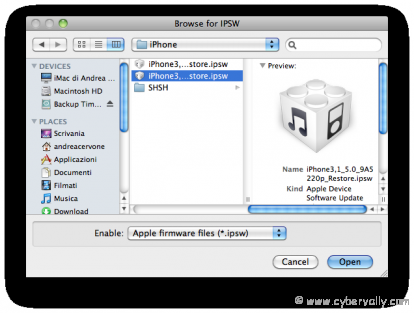
3. Download the latest Redsnow. Now direct Redsnow to the iOS 5 Beta Firmware.
4. Now check “Install Cydia†and then click “Nextâ€.
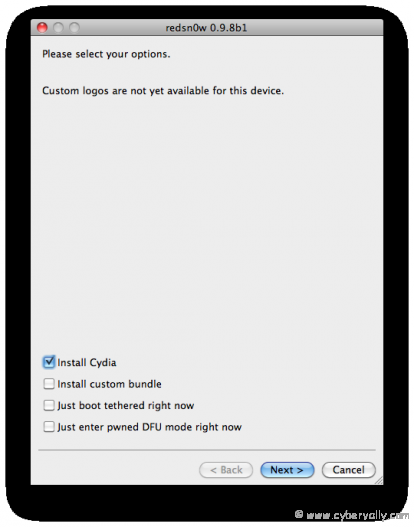
5. Now, turn off your device leaving the device plugged in to the Mac otherwise this Jailbreak wont work.
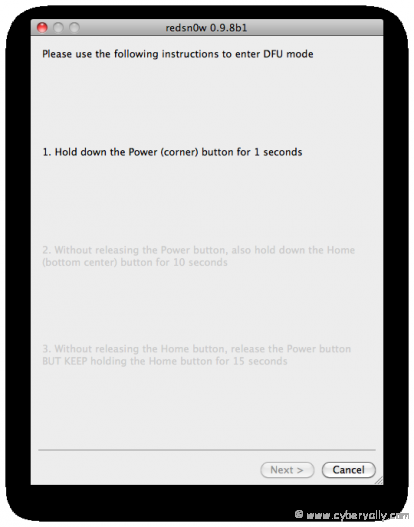
6. In this step you will get instructions of how to boot your device into the DFU mode. Just press and hold your “Home†and “Power†button for 10 seconds. Now release the “Power†button but hold your “Home†button for 10 seconds more.
7. All done now. Once the process is finished Redsnow 0.9.8 jailbreak iOS 5 by giving a notification.
Note: We are not responsible for any future issues due to unlock. If you are using a career unlock phone then don’t use this Jailbreak, it will break your unlock.
If you’re a Facebook user and want to keep up on the latest Technology news why don’t you join the CyberVally Facebook page?
If you enjoyed reading this post, please consider leaving a comment below or subscribing to the feed

