

Gmail has introduced new styles for inbox that allows you to see unread, important and starred emails first as against usually display of email messages, users can easily choose the required styles that appear as tabs at the top of their inbox. You can  always switch back to your inbox style anytime by selecting it from Inbox labels’ drop down menu.

How to switch to new Gmail inbox style
1. In your Gmail account you should notice new “Try on a new inbox†section at the top.
2. You should see tab buttons next to “Try on a new inbox† Named: Classic, Important first, Unread first, Starred first and Priority Inbox. Select suitable button to view email messages arranged differently.
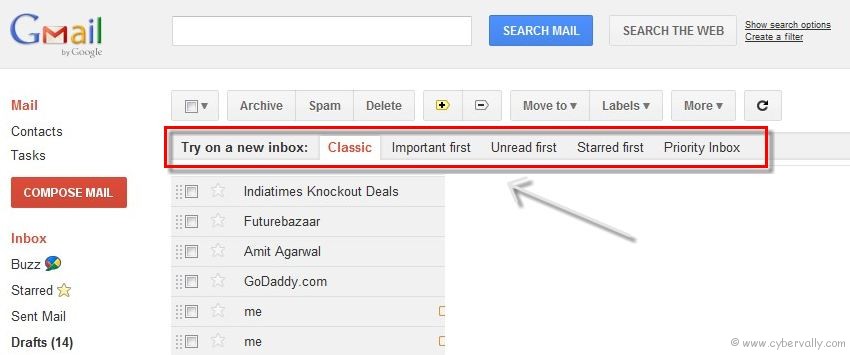
The following are the new styling features that appear as tabs at the top of the inbox.
Classic – This is the default inbox style most people are used to. In the Classic inbox, messages are ordered chronologically, with your most recent email at the top.
Priority Inbox – Important and unread messages appear at the top of your inbox, then starred messages, then everything else. Each section can be customized further, so you can create your own inbox style.
Important first – This style puts important mail at the top of the page (both read and unread messages). Everything else is in its own section at the bottom of your inbox. You may have noticed that we turned on importance arrows for everyone a few weeks ago; this inbox style separates messages with these arrows from those without.
Unread first – Simple: unread mail at the top; everything else at the bottom.
Starred first – Starred messages at the top; everything else at the bottom.
If you’re a Facebook user and want to keep up on the latest Google+ Tricks, why don’t you join the CyberVally Facebook page?


you say “you should see,” but what if you don’t? is there a way to make these inbox possibilities appear? i’m not seeing them.