

In many times it is very helpful to get chat history for future reference. If your college given some website information through messenger chat window and you need this information after some days, it wont find from outlook.com mail. For this feature you need to enable your chat history in outlook.com mail service. It’s not enabled by default, but here’s how to set it up to view chat history. Please follow the below steps to enable it.
1. Login to your Outlook.com account.
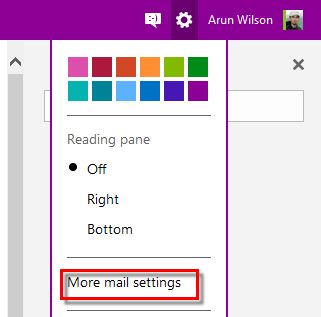
2. Click on the ‘Settings’ icon and from the available options, choose ‘More Mail Settings’.
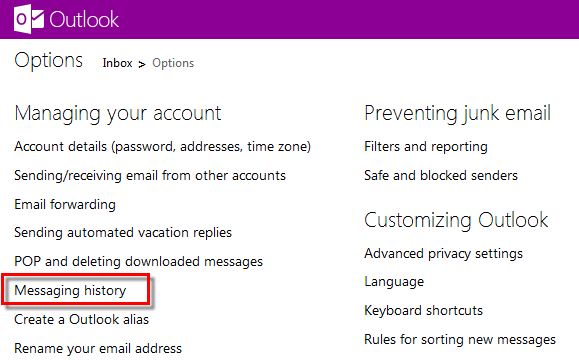
3. In the Settings screen, under Managing your account, choose Messaging history option.
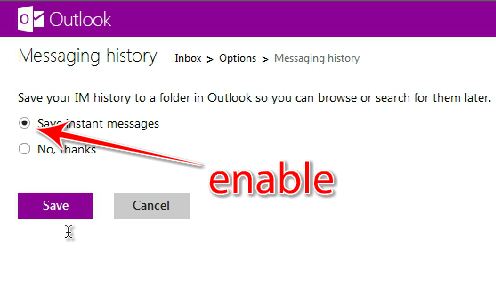
4. Check Save Instant Messages and click Save. You can connect Facebook, Google+ and other social networking sites to Outlook.com and also save the chat history.
5. Return to the main Outlook main window.
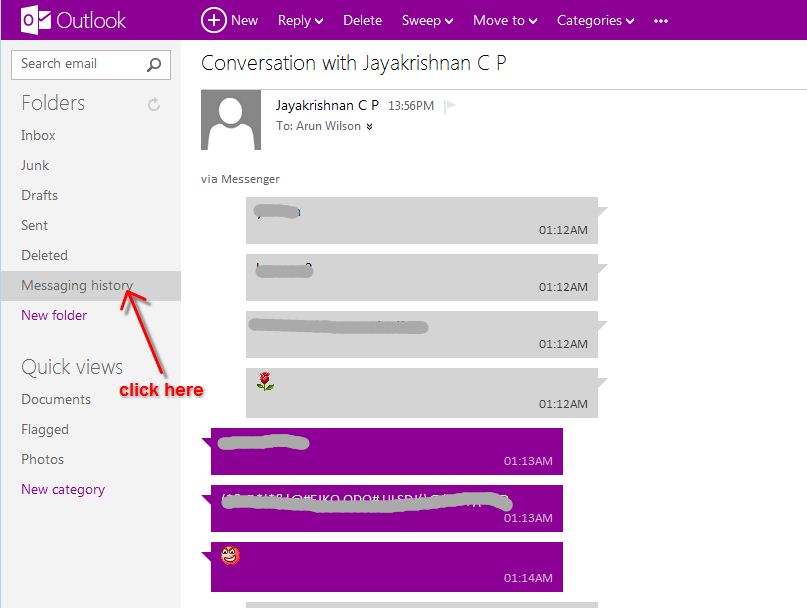
6.When you want to view your chat history, just choose the folder on the left side of the screen. It will take some time to appear in your inbox after you close a chat.
We value your comments. Feel free to discuss here any ideas. Share this information with your friends.
You can follow us on Twitter or join our Facebook fan page to keep yourself updated on all the latest from Microsoft, Google and Apple.

